
HA Solutions for SAP HANA using SAPHanaSR-angi #
SUSE Linux Enterprise Server for SAP applications is the leading Linux platform for SAP HANA, SAP S/4HANA and SAP NetWeaver. Two of the key components of SLES for SAP are SUSE Linux Enterprise High Availability (SLE HA) and resource agents (RAs). SLE HA provides Pacemaker, an open-source cluster framework. The resource agents manage automated failover of SAP HANA system replication, S/4HANA ASCS/ERS, and NetWeaver ASCS/ERS.
This document provides an overview of the High Availability solutions that SUSE supports for SAP HANA system replication
on SLES for SAP 15 and 16, using the SAPHanaSR-angi
resource agent. New solutions will be added when they become available.
Copyright © 2023–2026 SUSE LLC and contributors. All rights reserved.
Permission is granted to copy, distribute and/or modify this document under the terms of the GNU Free Documentation License, Version 1.2 or (at your option) version 1.3; with the Invariant Section being this copyright notice and license. A copy of the license version 1.2 is included in the section entitled “GNU Free Documentation License”.
For SUSE trademarks, see https://www.suse.com/company/legal/. All third-party trademarks are the property of their respective owners. Trademark symbols (®, ™ etc.) denote trademarks of SUSE and its affiliates. Asterisks (*) denote third-party trademarks.
All information found in this book has been compiled with utmost attention to detail. However, this does not guarantee complete accuracy. Neither SUSE LLC, its affiliates, the authors nor the translators shall be held liable for possible errors or the consequences thereof.
1 Support statement #
1.1 Supportability definition #
| Category | Definition |
|---|---|
| Mandatory | De facto, must be implemented this way. |
| Supported | Supported, with a published configuration guide. |
| Supported but undocumented | Supported, but a configuration guide is not published. SUSE will accept bug reports and fix code, if needed. |
| Supported with consulting PoC | Support is possible if the consulting PoC proves to be working. |
| Non-supported | Not supported or not applicable. |
| Planned | On the roadmap to be tested and supported. |
| Legacy | Only supported for older release legacy systems. |
1.2 Infrastructure support #
The infrastructure can be on-premises, physical, virtual or in public cloud. The infrastructure must be supported by both SAP and SUSE Linux Enterprise High Availability so that important functions like fencing and virtual IP are supported.
Public cloud deployment usually needs additional documentation focusing on the cloud-specific implementation details. Check the documentation provided by the respective public cloud vendor.
The support details for SUSE's High Availability solutions for SAP and the support process for each public cloud vendor are defined in the following SAP Notes:
| Company | SAP Note |
|---|---|
| SUSE | SAP Note 1763512: Support details for SUSE Linux Enterprise for SAP Applications - HA Solution for SAP NetWeaver and SAP S/4HANA |
| Microsoft Azure | SAP Note 2513384: SUSE Linux Enterprise Server for SAP applications on Azure |
| AWS | SAP Note 1656099: SAP Applications on AWS: Supported DB/OS and AWS EC2 products |
| Google Cloud | SAP Note 2456432: SAP Applications on Google Cloud: Supported Products and GCP VM types |
For more details, see the SUSE knowledgebase article SLES for SAP - How To Engage SAP and SUSE to address Product Issues.

If necessary, all documented SUSE Linux Enterprise High Availability scenarios can run the SAP workload while the High Availability cluster is temporarily disabled.
1.3 Supported SUSE software versions #
This document applies to SUSE Linux Enterprise Server for SAP applications 16 and 15.
The general SUSE software lifecycle applies for the described scenarios. See the SUSE lifecycle page for details:
https://www.suse.com/lifecycle/#suse-linux-enterprise-server-for-sap-applications-16
https://www.suse.com/lifecycle/#suse-linux-enterprise-server-for-sap-applications-15
2 Overview of HA solutions for SAP HANA system replication #
2.1 Overview of SAP HANA system replication #
SAP HANA system replication (HSR) provides the ability to copy and continuously synchronize an SAP HANA database to a secondary location in the same or another data center. SAP HANA system replication is implemented between two different SAP HANA systems with the same number of active nodes. After system replication is set up between the two systems, it replicates all the data from the primary SAP HANA system to the secondary SAP HANA system (initial copy). After this, any logged changes in the primary system are also sent to the secondary system.
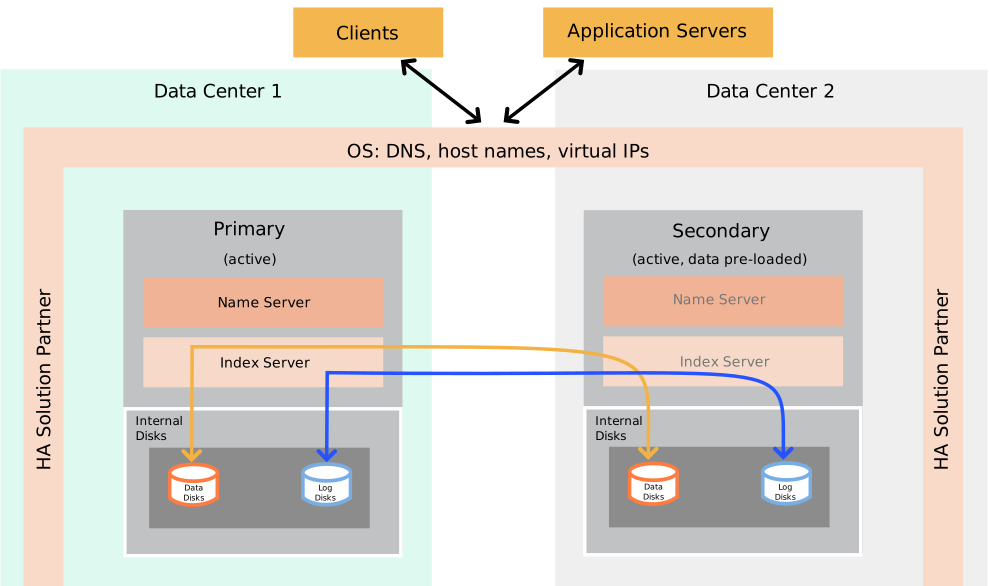
If the primary SAP HANA system fails, the system administrator must perform a manual takeover. Takeover can be performed using SAP HANA Cockpit or the command line. Manual failover requires continuous monitoring and could lead to higher recovery time. To automate the failover process, SUSE Linux Enterprise High Availability can be used. Using High Availability for the takeover process helps customers achieve service-level agreements for SAP HANA downtime by enabling faster recovery without any manual intervention.
Multiple SAP HANA High Availability scenarios are supported based on SAP HANA system replication. For variations, contact SUSE to discuss defining a PoC for a scenario that is not mentioned in the documentation.
You can use SAP HANA Fast Restart on RAM-tmpfs and SAP HANA on persistent memory if they are transparent to the High Availability cluster. On SLES for SAP 16, virtual persistent memory (vPMEM) is still supported, but Physical PMEM (Intel Optane) is not supported.
SAP HANA Native Storage Extension (NSE) is supported in High Availability solutions for automated SAP HANA system replication in both Scale-up and Scale-out. This feature does not change the SAP HANA topology or interfaces to the High Availability cluster. However, unlike SAP HANA NSE, the HANA Extension Nodes do change the topology and are therefore not currently supported by SUSE Linux Enterprise High Availability. Refer to the SAP documentation for details of SAP HANA NSE and its functional restrictions.
2.2 Resource agents for automated SAP HANA system replication #
To provide a streamlined High Availability solution, SUSE is evolving its SAP HANA clustering infrastructure
away from legacy, decade-old code bases. The traditional framework required administrators to
manage two distinct resource agents: SAPHanaSR for scale-up topologies
and SAPHanaSR-ScaleOut for scale-out topologies. This architectural
division is being consolidated into SAPHanaSR-angi (Advanced Next
Generation Interface), a unified, single code base engineered to sustain reliable High Availability for
SAP HANA over the next decade.
This evolution drastically reduces operational complexity by introducing an identical software
package and highly similar configuration models regardless of the underlying scale-up or
scale-out environment. Although the classic resource agents will remain supported for the
entire lifetime of SLES for SAP 15, SAPHanaSR-angi is also
available in SLES for SAP 15 SP4+. This is the recommended choice for all new deployments,
and will completely replace the classic resource agents as the default standard in
SLES for SAP 16.
Along with optimizations like faster takeover capabilities, SAPHanaSR-angi
also supports a live, in-place upgrade from the classic resource agents, without requiring any
SAP HANA downtime.
| OS release | HANA scale-up | HANA scale-out |
|---|---|---|
| SLES for SAP 16 | SAPHanaSR-angi only | SAPHanaSR-angi only |
| SLES for SAP 15 |
|
|
2.3 Notation formula #
This table shows the notation formula used in the following sections to describe the different configurations for SAP HANA system replication.
| Notation | Definition |
|---|---|
| [ ] | Cluster running |
| { } | Cluster DR passive |
| A B C D | Master nameserver node |
| a b c d | Worker node |
| _ | Standby node |
| x | XSA node |
| => | Sync, syncmem replication |
| -> | Async replication |
| ' | Primary IP address |
| " | Secondary IP address |
2.4 Common configurations for automated SAP HANA system replication #
Below is a summary of the most common and newly supported configurations for
SAPHanaSR-angi. For the complete support matrix for all
supported topologies, see Section 3, “Support matrix for automated SAP HANA system replication”.

SAPHanaSR-angi configuration variants
SAPHanaSR-angi introduces two configuration variants that allow
administrators to choose the failover behavior that best aligns with their operational and
availability requirements. While both variants provide High Availability for SAP HANA, they differ in how
they respond to failures and balance recovery speed against service stability.
Progressive variant: Optimized for rapid recovery by proactively fencing the affected site when critical SAP HANA or file system failures are detected, enabling fast and reliable failover. This is the recommended option for most new deployments, particularly in cloud and performance-optimized environments.
Conservative variant: Prioritizes service stability by attempting to recover SAP HANA locally before fencing cluster nodes, reducing the likelihood of unnecessary fencing. This variant is best suited for traditional on-premises environments where maximizing local recovery is preferred over the fastest possible failover.
- Scale-up, performance-optimized [A' => B], including read-enabled on the secondary site [A' => B"]
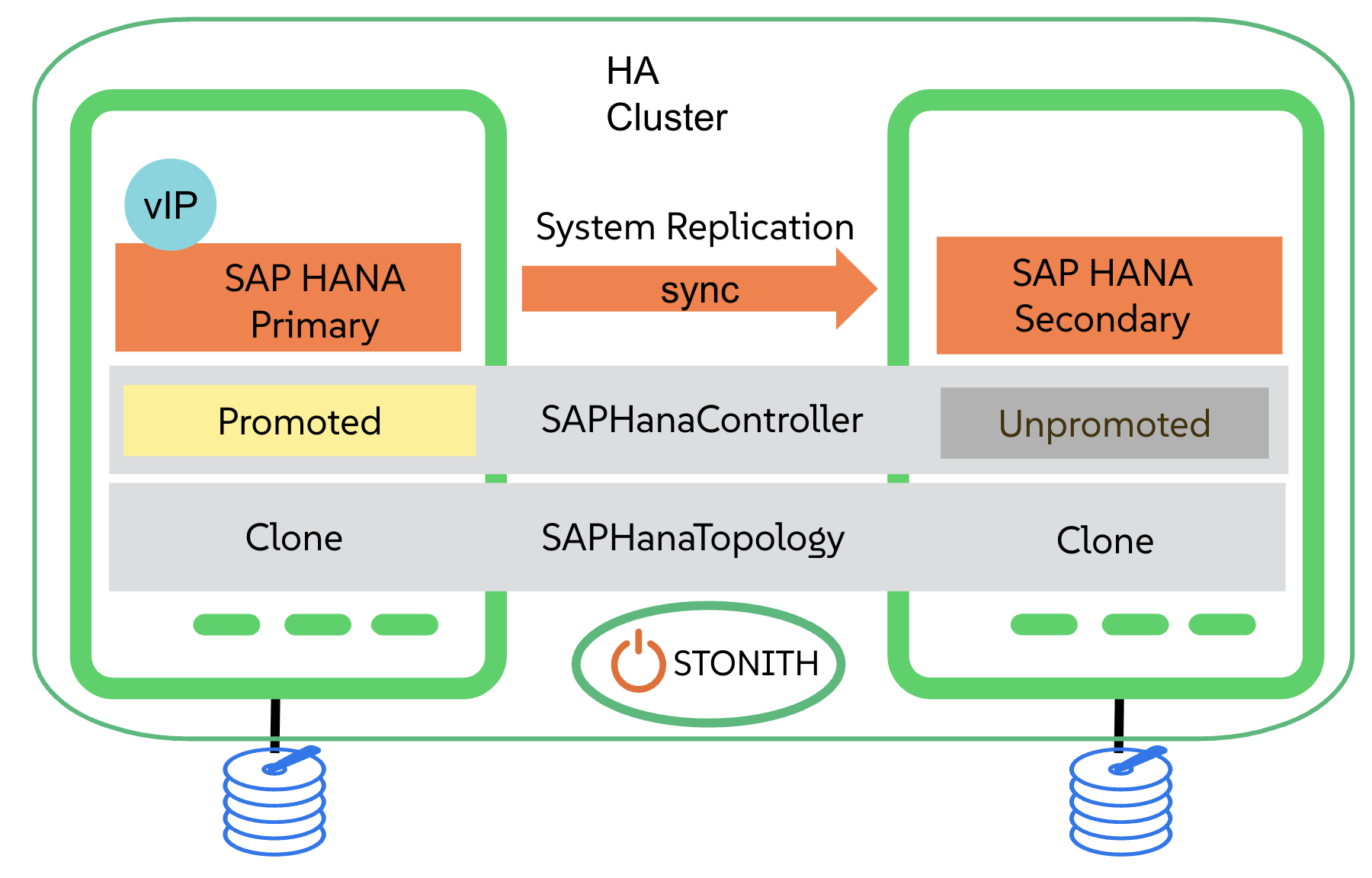 Figure 2: Scale-up, performance-optimized #
In the performance-optimized scenario, an SAP HANA RDBMS site A is synchronizing with an SAP HANA RDBMS site B on a second node. As the SAP HANA RDBMS on the second node is configured to preload the tables, the takeover time is typically very short.
Read access can be allowed on the secondary site. To support this read-enabled scenario, a second virtual IP address is added to the cluster and bound to the secondary role of the system replication.
- SAP HANA XSA stand-alone [xB <= A'x']
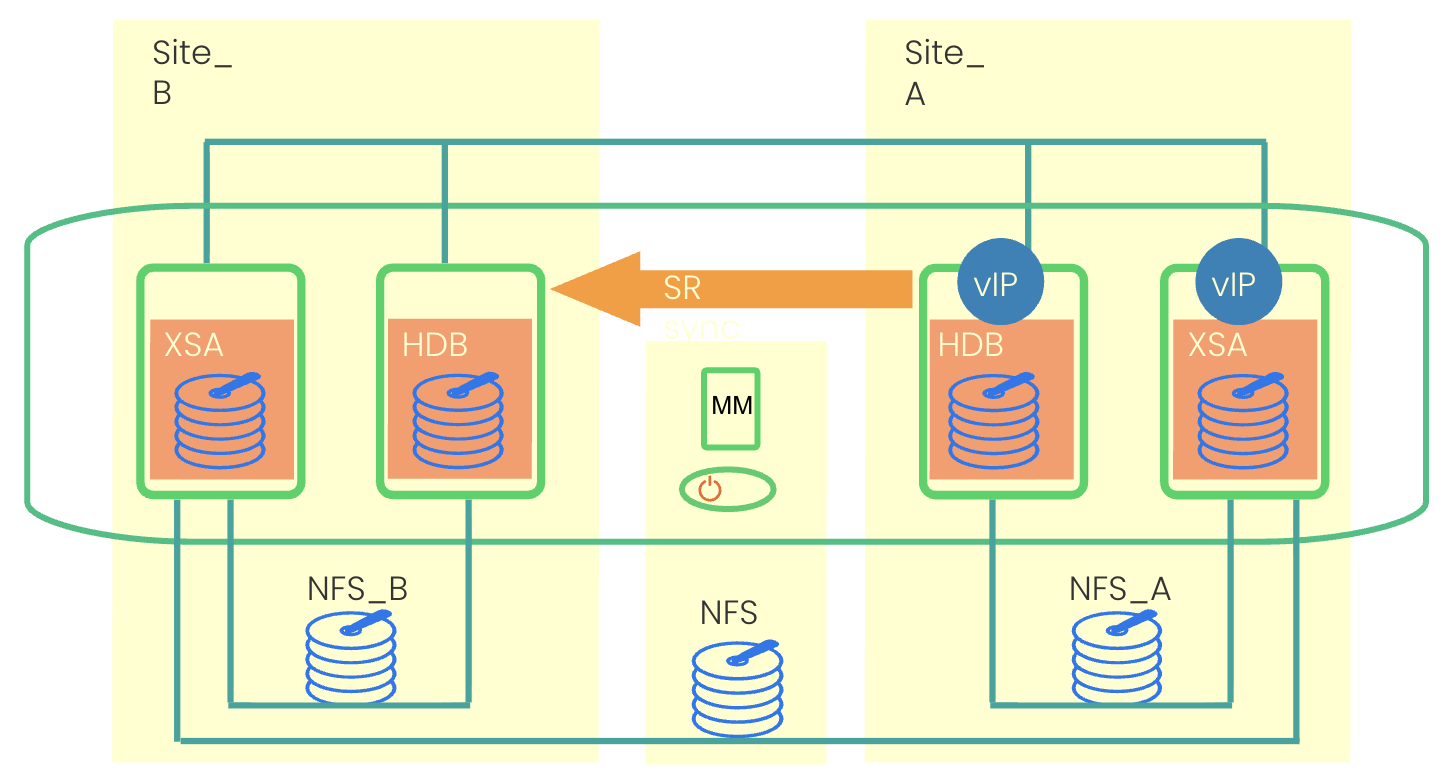 Figure 3: SAP HANA XSA stand-alone #
SAP HANA XSA stand-alone is supported in the cluster by deploying XSA worker nodes alongside the SAP HANA master/worker nodes. Dedicated IP addresses are assigned to the primary XSA worker as well as the primary HANA master/worker node to ensure consistent service access. SAP HANA system replication is enabled between the two HANA master/worker nodes, while a shared NFS file system maintains the XSA work directory across both sites to support seamless failover. The SUSE Linux Enterprise High Availability solution for SAP XSA stand-alone is based on the High Availability architecture for SAP HANA scale-out ERP, with the
SAPHanaSR-angiProgressive variant.- DR region with passive cluster (Technology Preview) {D <= C} <- [A' => B]
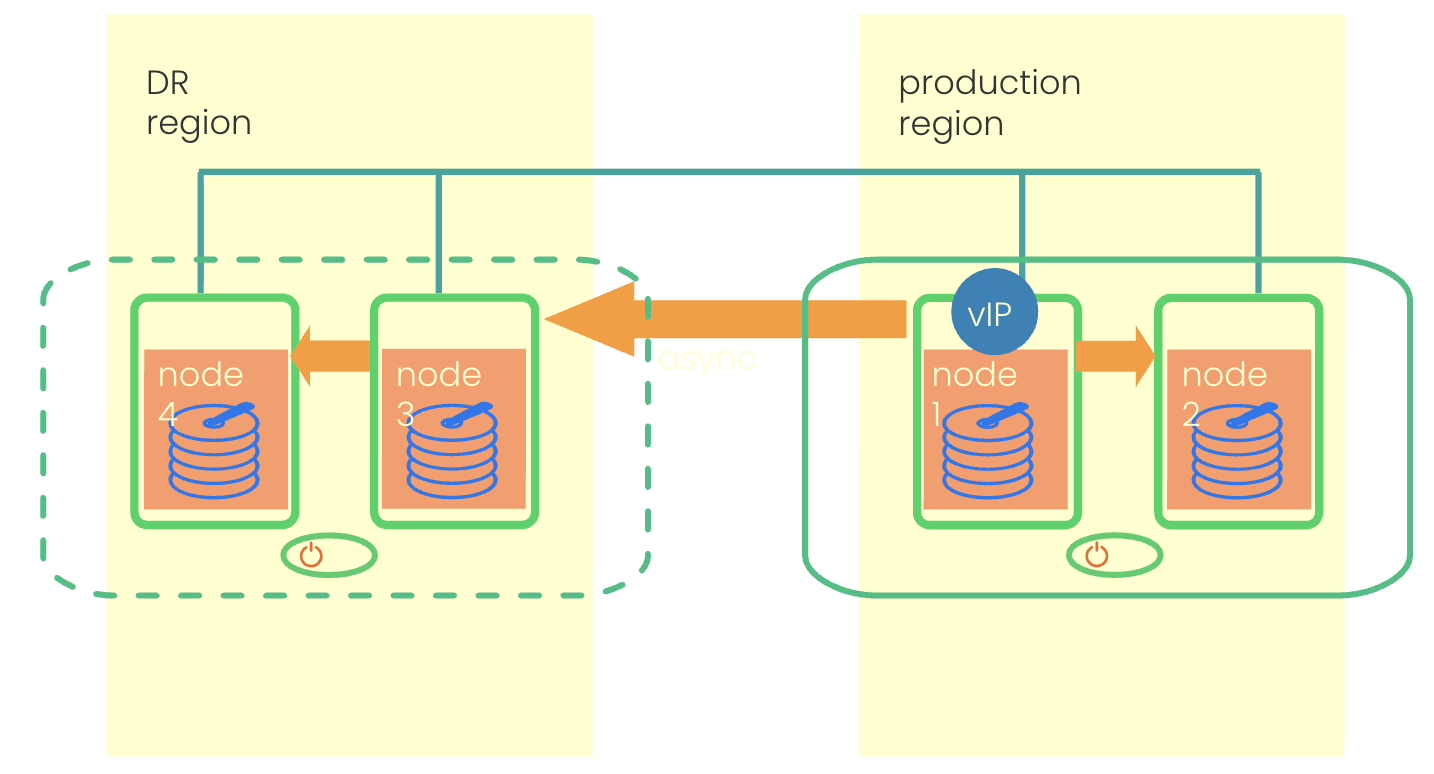 Figure 4: DR region with passive cluster #
This deployment consists of a production region protected by a High Availability cluster using the
SAPHanaSR-angiscale-up performance-optimized with Progressive variant. A separate disaster recovery (DR) region is equipped with a passive High Availability cluster to support recovery operations. In the event of a disaster, failover to the DR region is performed through a manual DR takeover process. There is no automated cluster takeover between the production and DR sites.
3 Support matrix for automated SAP HANA system replication #
3.1 Automated SAP HANA system replication in HANA scale-up #
| SAP HANA scale-up configuration | Status |
|---|---|
| Performance-optimized | Supported (Documentation) |
| Performance-optimized, second site read-enabled | Supported (Documentation) |
| Performance-optimized, Multi-Target SR, third site NOT managed by the cluster | Supported (Documentation) |
| Performance-optimized, Multi-Target SR, third site in passive cluster | Technology preview |
| Performance-optimized, Multi-SID in one cluster (MCOS) | Supported, but undocumented |
| Performance-optimized, with S/4 ENSA2 in the same cluster | Supported, but undocumented |
| Performance-optimized, with S/4 ENSA1 in the same cluster (only on SLES for SAP 15) | Supported, but undocumented |
| Performance-optimized, with stand-alone S/4 Application Server in the same cluster | Supported, but undocumented |
| Cost-optimized | Supported, but undocumented |
| Cost-optimized, Multi-Target | Non-supported |
| Performance-optimized, Multi-Target SR, third site in the same cluster | Non-supported |
| Two performance-optimized clusters connected | Non-supported |
3.2 Automated SAP HANA system replication in HANA scale-out #
| SAP HANA scale-out configuration | Status |
|---|---|
| Performance-optimized, up to 12 nodes, NO standby (BW) | Supported |
| Performance-optimized, up to 4 nodes, second site read-enabled (ERP) | Supported |
| Performance-optimized, Multi-Target SR, third site NOT managed by the cluster | Supported |
| Performance-optimized, up to 30 nodes including standby (BW) | Supported, but undocumented |
| Performance-optimized, up to 4 nodes, with stand-alone XSA, NO standby | Supported, but undocumented |
| Performance-optimized, Multi-Target SR, third site in the same cluster | Non-supported |
| Performance-optimized, Multi-SID | Non-supported |
| Cost-optimized | Non-supported |
| Two performance-optimized clusters connected | Non-supported |
4 HANA database HA/DR provider hook scripts #
SUSE provides several hook scripts to enhance the integration between SAP HANA and the
SUSE Linux Enterprise High Availability cluster. This section describes the HA/DR provider hook scripts for the
SAPHanaSR-angi resource agent. The SUSE best practice configuration
guides explain how to use and configure these hooks.
| Script | Usage |
|---|---|
susHanaSR.py | Mandatory for data integrity in case of cluster sr_takeover |
| susTkOver.py | Protects from data inconsistency caused by manual sr_takeover |
| susChkSrv.py | Avoids downtime caused by local indexserver restart |
| susCostOpt.py | Used in scale-up cost-optimized to handle secondary site in case of cluster sr_takeover |
| HA/DR provider hook script | Scale-up cost-optimized | Scale-up performance-optimized | Scale-out performance-optimized |
|---|---|---|---|
| susHanaSR.py | Mandatory | Mandatory | Mandatory |
| susTkOver.py | Supported | Supported | Supported |
| susChkSrv.py | Non-supported | Supported | Supported |
| susCostOpt.py | Mandatory | Not Applicable | Not Applicable |
5 Upgrading to SAPHanaSR-angi #
Existing SAP HANA High Availability clusters can be upgraded from the legacy
SAPHanaSR or SAPHanaSR-ScaleOut
resource agents to SAPHanaSR-angi without requiring SAP HANA downtime.
The in-place upgrade replaces the legacy resource agents and provider scripts with the new
SAPHanaSR-angi components while preserving the existing cluster and
SAP HANA system replication configuration, minimizing service disruption and avoiding a full cluster rebuild.
The environment must meet the documented prerequisites and the upgrade must be carefully planned. SUSE recommends the following approach:
Validate the cluster configuration.
Back up the existing configuration.
Test the upgrade procedure in a non-production environment.
Use the upgrade guidance and automation scripts to generate a cluster-specific runbook before performing the production upgrade.
For more information, see https://www.suse.com/c/how-to-upgrade-to-saphanasr-angi/.
6 Documentation and configuration guides #
Refer to the official Web sites for up-to-date documentation and configuration guides:
- SUSE Best Practices
SUSE Best Practices: SAP applications on SUSE Linux 16: https://documentation.suse.com/sbp/sap-16/
SUSE Best Practices: SAP applications on SUSE Linux Enterprise 15: https://documentation.suse.com/sbp/sap-15/
- SAPHanaSR-angi
What is
SAPHanaSR-angi?: https://www.suse.com/c/what-is-saphanasr-angi/What are
SAPHanaSR-angiconfiguration variants?: https://www.suse.com/c/what-are-saphanasr-angi-configuration-variants/How to upgrade to
SAPHanaSR-angi: https://www.suse.com/c/how-to-upgrade-to-saphanasr-angi/SUSE HA for SAP HANA scale-up cost-optimized improved using ANGI: https://www.suse.com/c/suse-ha-for-sap-hana-scale-up-cost-optimized-improved/
Man pages for
SAPHanaSR-angi: https://manpages.opensuse.org/Leap-16.0/SAPHanaSR-angi/index.html (For reference only. For the latest information, view the man pages on your SLES for SAP system.)
- Public cloud providers
Microsoft Azure: https://azure.microsoft.com/en-us/solutions/sap/#documentation
Google Cloud: https://cloud.google.com/solutions/sap/