
Configuring and Managing iSCSI Storage
iSCSI (Internet Small Computer Systems Interface) is a storage networking protocol
that transmits SCSI commands over IP networks, allowing Linux systems to access
remote block storage as if it were a local physical hard drive.
iSCSI runs over existing Ethernet infrastructure and does not require costly dedicated storage hardware.
This makes it a cost-effective solution to consolidate storage. It also delivers
high-performance, low-latency block-level access, ideal for virtualized environments
and enterprise databases. On SUSE Linux, iSCSI uses the kernel-level LIO target
(targetcli) on the storage server and the Open-iSCSI initiator
(iscsiadm) on the client.
Prerequisites
Linux fundamentals: Understanding basic Linux commands, file permissions, directory structures and use of the command line.
Networking fundamentals: Understanding how IP addresses and subnets work, as iSCSI relies on your local network to find the storage. It also helps to know that iSCSI uses TCP Port 3260 to communicate.
Storage fundamentals: Understanding the difference between file-level storage (like a folder on Google Drive) and block-level storage (like a raw, unformatted hard drive), as iSCSI is strictly block-level.
1 What is iSCSI and how does it work? #
iSCSI is a networking protocol that enables the transmission of SCSI commands over standard IP networks. It enables a host system (the initiator) to access remote block-level storage on a server (the target) using standard Ethernet cables and switches. The client operating system formats and manages the assigned remote disk space—known as a Logical Unit Number (LUN)—using native file systems like Btrfs, XFS or ext4.
By wrapping storage-level data blocks into standard TCP/IP packets, it bridges the gap between local storage performance and network flexibility, using existing Ethernet infrastructure like switches and cables rather than expensive, specialized hardware. In an iSCSI setup, the initiator connects to a target to claim a portion of disk space known as a LUN (Logical Unit Number), which the client can then format and manage with its own native file system. Note that LU (Logical Unit) is the data container or virtual disk and LUN (Logical Unit Number) is the numerical address of the container. Linux iSCSI provides iSCSI initiator and iSCSI LIO (Linux-IO) target software for connecting Linux servers to central storage systems.
1.1 iSCSI core architecture and components #
The iSCSI architecture relies on two primary entities: the initiator (the client requesting storage) and the target (the server serving storage). Storage capacity is presented as LUNs.
In a physical iSCSI environment, the initiator is the server’s software that requests data, the LIO target is the physical storage appliance that hosts the data and the LUN (Logical Unit Number) represents the specific physical disk capacity assigned to the server.
The iSCSI initiator: The initiator is the physical server that needs to consume the storage. It initiates the conversation with the target.
HBA (host bus adapter): While you can use a standard network card, a physical iSCSI HBA is a dedicated expansion card installed in the server's PCIe slot. It contains its own processor to handle storage traffic and prevents the server’s main CPU from becoming overwhelmed.
Physical ports: These are the dedicated connection points on the server used exclusively for storage traffic to ensure low latency and high throughput.
The iSCSI LIO target: The target is the physical hardware device that houses the data. LIO (Linux-IO) is the standard, open-source storage enterprise-grade target for the Linux kernel.
The LUN: While a LUN is a logical identifier, it directly corresponds to the physical disk resources allocated to a server.
Physical disk groups: A LUN is often a physical collection of disks bound together in a RAID configuration.
The drive to the OS: From the server's perspective, the LUN is treated as a physical local hard drive. You can format, partition and install files on it just like a drive plugged directly into the motherboard.
Physical capacity: The size of the LUN is limited by the number of physical disks installed in the target array.
1.2 Key technical characteristics of remote iSCSI storage #
The following are some of the common characteristics of iSCSI:
Block-level access: Unlike a network share where you see files, with iSCSI, your system sees raw sectors. This allows you to format the remote drive with any file system such as NTFS, ReFS, or ext4.
Distance and flexibility: The storage can be in a server rack across the room or in a data center across the city. Because iSCSI uses block-level storage, the system treats this network-attached storage exactly like a local hard drive. When traversing these distances, security is maintained by enforcing CHAP for secure authentication between the system and the storage target, alongside IPsec to encrypt the data packets in transit.
Low latency requirement: Because the OS thinks the drive is local, it expects fast responses. This is why remote iSCSI usually requires a high-speed network ( preferably 10Gbps or higher).
1.3 What are the main use cases for iSCSI storage? #
The common use cases for iSCSI include:
Virtualization: Servers running VMware or Hyper-V store virtual machines on remote iSCSI targets so that if one physical server dies, another can immediately take over the disk over the network.
Database hosting: High-performance databases like SQL Server or Oracle require block-level access to manage data placement and logging. Since iSCSI presents itself as a local physical disk rather than a shared folder, it satisfies the strict technical requirements of database software while keeping the data on a secure and centralized server.
Consolidated backup and disaster recovery: iSCSI allows organizations to centralize backups from various machines onto one large and manageable storage array. It also supports diskless booting, where a server with no internal hard drive can load its entire operating system directly from a remote iSCSI target, making hardware replacement much faster.
External storage array integration: SLES 16 connects to high-performance external storage systems, like NetApp, to centralize data management over iSCSI. Instead of using internal drives, administrators provision network-based virtual disks (LUNs) that SUSE Linux Enterprise Server 16 handles via the
open-iscsiframework. The OS leverages kernel multi-queueing for low-latency throughput and usesmultipath-toolsto combine multiple network paths for redundancy. This setup eliminates single points of failure, allowing the remote storage to behave like a local disk that can be formatted with Btrfs or XFS and scaled dynamically without downtime.
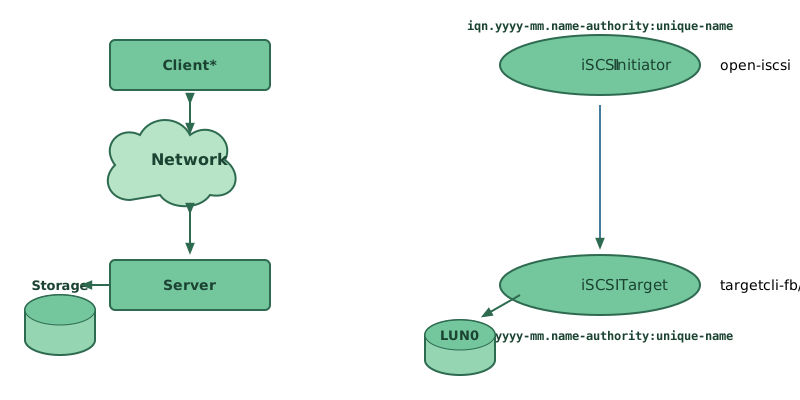
2 Understanding targetcli and iscsiadm command-line utilities #
The iSCSI framework relies on two primary command-line utilities:
targetcli and iscsiadm. Together, they
provide the functionality required to configure iSCSI targets, discover
available storage resources, establish connections between initiators and
targets, and manage iSCSI storage over IP networks.
While they both facilitate the transmission of SCSI commands over IP networks, they
operate on opposite ends of the connection. targetcli
is the administration interface for the Linux-IO (LIO) target subsystem,
used on the target (server) to define, export and manage physical or
virtual storage resources. In contrast, iscsiadm is
the primary utility of the Open-iSCSI project, used on the initiator
(client) to discover, log into, and manage remote iSCSI targets over an IP network.
2.1 Using the targetcli utility to export storage #
The targetcli tool is the primary command-line administration tool used to configure and manage the LIO (Linux-IO) target subsystem, which is the standard open-source storage target for the Linux kernel.
It operates as an interactive shell with a hierarchical file-system-like structure and allows system administrators to export local storage resources—such as physical disks, files, or LVM (Logical Volumes) to remote clients via various fabrics, most notably iSCSI.
It provides a unified interface to define back stores, creates IQNs (iSCSI Qualified Names), and establishes ACLs (Access Control Lists).
Similar to a conventional shell, you can traverse the targetcli functional hierarchy using the cd command and
list contents with the ls command. While each directory has its own set of commands, these commands that are available in
all directories. You can use the help command in any directory to view a
list of available commands or information about any command in particular.
The targetcli tool is part of the
targetcli-fb package. This package is available in the
official SUSE Linux Enterprise Server software repository, and it can be installed using
the following command:
>sudozypper install targetcli-fb
To switch to the targetcli shell, run targetcli as
root:
>sudotargetcli
You can then run the ls command to see the default
configuration.
/> ls
o- / ............................ [...]
 o- backstores ................. [...]
 | o- block ..... [Storage Objects: 0]
 | o- fileio .... [Storage Objects: 0]
 | o- pscsi ..... [Storage Objects: 0]
 | o- ramdisk ... [Storage Objects: 0]
 | o- rbd ....... [Storage Objects: 0]
 o- iscsi ............... [Targets: 0]
 o- loopback ............ [Targets: 0]
 o- vhost ............... [Targets: 0]
 o- xen-pvscsi .......... [Targets: 0]
/>
targetcli supports the following back-ends:
fileio, local image fileblock, block storage on a dedicated disk or partitionpscsi, SCSI pass-through devicesramdisk, memory-based back-endrbd, Ceph RADOS block devices
/backstores/fileio create test-disc /alt/test.img 1G
This creates a 1 GB test.img image in the
specified location (in this case /alt). Run
ls, and you should see the following result:
/> ls
o- / ........................................................... [...]
  o- backstores ................................................ [...]
  | o- block .................................... [Storage Objects: 0]
  | o- fileio ................................... [Storage Objects: 1]
  | | o- test-disc ... [/alt/test.img (1.0GiB) write-back deactivated]
  | |   o- alua ......     .......................... [ALUA Groups: 1]
  | |     o- default_tg_pt_gp      .... [ALUA state: Active/optimized]
  | o- pscsi .................................... [Storage Objects: 0]
  | o- ramdisk .................................. [Storage Objects: 0]
  | o- rbd ...................................... [Storage Objects: 0]
  o- iscsi .............................................. [Targets: 0]
  o- loopback ........................................... [Targets: 0]
  o- vhost .............................................. [Targets: 0]
  o- xen-pvscsi ......................................... [Targets: 0]
/>
2.2 Using the iscsiadm utility to manage initiator connections #
The iscsiadm tool is used in Linux environments to manage and administer the Open-iSCSI implementation, acting as the primary interface for configuring and managing iSCSI connections.
It allows administrators to discover targets on a network, log in or out of specific storage portals, and manage a local database of persistent iSCSI nodes.
By communicating with the iscsid daemon, it facilitates the mapping of remote block storage devices over an IP network, making remote disks appear as local SCSI devices, such as /dev/sdb, to the operating system.
While iscsiadm operations logically require a running iscsid daemon to execute, you do not need to start it manually because systemd socket activation iscsid.socket automatically spawns the iscsid service on demand.
When running the discovery the first time, the internal
database of the iSCSI initiator is created in the directory
/var/lib/iscsi/.
If your discovery is password-protected, provide the authentication
information to iscsid. Because the internal database does not exist when
doing the first discovery, it cannot be used now. Instead, the
configuration file /etc/iscsid.conf must be edited to
provide the information. To add your password information for the
discovery, add the following lines to the end of
/etc/iscsid.conf:
discovery.sendtargets.auth.authmethod = CHAP
discovery.sendtargets.auth.username = USERNAME
discovery.sendtargets.auth.password = PASSWORD
The discovery stores all received values in an internal persistent database. In addition, it displays all detected targets. Run this discovery with the following command:
>sudoiscsiadm-m discovery --type=st --portal=TARGET_IP10.44.171.99:3260,1 iqn.2006-02.com.example.iserv:systems
For each target defined on the iSCSI target, one line appears.
The special --login option of iscsiadm
creates all needed devices:
>sudoiscsiadm -m node -n iqn.2006-02.com.example.iserv:systems --login
The newly generated devices show up in the output of lsscsi and can now be mounted.
All information discovered by the iSCSI initiator is stored in two
database files that reside in /etc/iscsi. There is one
database for the discovery of targets and one for the discovered nodes.
When accessing a database, you first must select whether you want to get your
data from the discovery or from the node database. Do this with the
-m discovery and -m node parameters of
iscsiadm. Using iscsiadm with one of
these parameters gives an overview of the stored records:
>sudoiscsiadm -m discovery 10.44.171.99:3260,1 iqn.2006-02.com.example.iserv:systems
The target name in this example is
iqn.2006-02.com.example.iserv:systems. This name is
needed for all actions that relate to this special data set. To examine the
content of the data record with the ID
iqn.2006-02.com.example.iserv:systems, use the following
command:
>sudoiscsiadm -m node --targetname iqn.2006-02.com.example.iserv:systems node.name = iqn.2006-02.com.example.iserv:systems node.transport_name = tcp node.tpgt = 1 node.active_conn = 1 node.startup = manual node.session.initial_cmdsn = 0 node.session.reopen_max = 32 node.session.auth.authmethod = CHAP node.session.auth.username = joe node.session.auth.password = ******** node.session.auth.username_in = EMPTY node.session.auth.password_in = EMPTY node.session.timeo.replacement_timeout = 0 node.session.err_timeo.abort_timeout = 10 node.session.err_timeo.reset_timeout = 30 node.session.iscsi.InitialR2T = No node.session.iscsi.ImmediateData = Yes ....
To edit the value of one of these variables, use the command
iscsiadm with the update operation. For
example, if you want iscsid to log in to the iSCSI target when it
initializes, set the variable node.startup to the value
automatic:
sudo iscsiadm -m node -n iqn.2006-02.com.example.iserv:systems \
-p ip:port --op=update --name=node.startup --value=automatic
Remove obsolete data sets with the delete command, for example:
>sudoiscsiadm -m node -n iqn.2006-02.com.example.iserv:systems \ -p ip:port --op=delete

Use this option with caution because it deletes the record without any additional confirmation prompt.
To get a list of all discovered targets, run the sudo iscsiadm -m
node command.
3 How to install and configure an iSCSI LIO target server? #
The iSCSI LIO target is an open source, kernel-level software framework in Linux that transforms a standard server into a high-performance storage controller by exporting local storage over a network. It acts as the server side of an iSCSI SAN (Storage Area Network), managing the communication between physical backstores and remote clients to provide seamless, block-level data access. An iSCSI SAN is a specialized high-speed network that provides block-level network access to storage.
Prepare the storage. Ensure you have an unpartitioned block device ready. You can allocate either a dedicated disk partition or the whole disk, for example, /dev/vdb.
To install and configure the iSCSI LIO target server, follow the steps in the procedure:
Configure the target using
targetcli:>sudotargetcliCreate a backstore:
> /backstores/block create test_storage dev=/dev/vdb
Create an IQN (iSCSI Qualified Name):
> iscsi/ create iqn.2026-04.com.example:sles.target
Create a LUN (Logical Unit Number):
> iscsi/iqn.2026-04.com.example:sles.target/tpg1/luns create /backstores/block/test_storage
Navigate to the TPG1 subdirectory and enable the automated demo mode attributes:
> cd /iscsi/iqn.2026-04.com.example:sles.target/tpg1/
  /iscsi/iqn...e:sles.target/tpg1& set attribute generate_node_acls=1 demo_mode_write_protect=0
To display a complete, hierarchical tree view of the current Linux kernel LIO target configuration:
> ls
  o- / .........................................................................[...]
  o- backstores ................................................................[...]
  | o- block .....................................................Storage Objects: 1]
  | | o- test_storage ......................[/dev/vdb (20.0GiB) write-thru activated]
  | |   o- alua .................................................... [ALUA Groups: 1]
  | |     o- default_tg_pt_gp ........................ [ALUA state: Active/optimized]
  | o- fileio .................................................. [Storage Objects: 0]
  | o- pscsi ................................................... [Storage Objects: 0]
  | o- ramdisk ................................................. [Storage Objects: 0]
  o- iscsi ............................................................. [Targets: 1]
  | o- iqn.2026-04.com.example:sles.target ................................ [TPGs: 1]
  |   o- tpg1 ................................................ [no-gen-acls, no-auth]
  |     o- acls ........................................................... [ACLs: 1]
  |     | o- iqn.2026-04.com.example:sles.initiator ................ [Mapped LUNs: 1]
  |     |   o- mapped_lun0 ............................[lun0 block/test_storage (rw)]
  |     o- luns ........................................................... [LUNs: 1]
  |     | o- lun0 .................[block/test_storage (/dev/vdb) (default_tg_pt_gp)]
  |     o- portals ..................................................... [Portals: 1]
  |       o- [::0]:3260 ........................................................ [OK]
  o- loopback .......................................................... [Targets: 0]
  o- vhost ............................................................. [Targets: 0]
  o- xen-pvscsi ........................................................ [Targets: 0]
Save:
> saveconfig
Exit:
> exit
4 How to install and configure an iSCSI initiator? #
An iSCSI initiator is the client component in a SAN that initiates communication by sending SCSI commands over an IP network to a remote storage target. Once connected, it makes the remote network storage appear to the local operating system as a physically attached, raw block device.
Install the iSCSI initiator if needed:
>sudozypper install install open-iscsiThe following steps are optional, as the initiator name is set by default.
Configure the initiator name. The name must match the ACL created on the target. Open the configuration file:
vi /etc/iscsi/initiatorname.iscsi
Edit the line to match:
InitiatorName=iqn.2026-04.com.example:sles.initiator
Restart the service:
>sudosystemctl restart iscsid
5 Establishing and validating an iSCSI session between the iSCSI LIO target server and initiator #
The following procedures assume that both the iSCSI LIO target server and initiator
are installed and configured.
In the examples throughout this section, the iSCSI LIO target server uses the IP address
192.168.122.200 and the iSCSI initiator uses 192.168.122.181.
Before attempting a connection, ensure the target is actively listening on the network:
>ss -nltp | grep 3260 LISTEN 0 256 *:3260 *:*You must see
0.0.0.0:3260or your specific target IP.Enter the
targetclishell.>sudotargetcli targetcli shell version 3.0.1 Copyright 2011-2013 by Datera, Inc and others. For help on commands, type 'help'.Verify the initiator's IQN is listed under the ACLs for your specific TPG (Target Portal Group):
  /> ls /iscsi
  o- iscsi ........................................................[Targets: 1]
    o- iqn.2026-04.com.example:sles.target ...........................[TPGs: 1]
      o- tpg1 ...........................................[no-gen-acls, no-auth]
        o- acls ......................................................[ACLs: 1]
        | o- iqn.2026-04.com.example:sles.initiator ...........[Mapped LUNs: 1]
        |   o- mapped_lun0 ......................[lun0 block/test_storage (rw)]
        o- luns ......................................................[LUNs: 1]
        | o- lun0 ...........[block/test_storage (/dev/vdb) (default_tg_pt_gp)]
        o- portals ................................................[Portals: 1]
          o- [::0]:3260 ...................................................[OK]
The initiator must connect with the target to pull the available records into its local database:
>sudoiscsiadm -m discovery -t sendtargets -p 192.168.122.200 192.168.122.200:3260,1 iqn.2026-04.com.example:sles.targetCheck that a file named after the target IQN now exists in
/var/lib/iscsi/nodes/:>sudosudo iscsiadm -m node | grep iqn.2026-04.com.example:sles.targetEstablish an active data session:
>sudoiscsiadm -m node -T iqn.2026-04.com.example:sles.target -p 192.168.122.200 --login Login to [iface: default, target: iqn.2026-04.com.example:sles.target, portal: 192.168.122.200,3260] successful.Map the remote storage as a local device:
>sudoiscsiadm -m session -P 1 Target: iqn.2026-04.com.example:sles.target (non-flash) Current Portal: 192.168.122.200:3260,1 Persistent Portal: 192.168.122.200:3260,1 ********** Interface: ********** Iface Name: default Iface Transport: tcp Iface Initiatorname: iqn.2026-04.com.example:sles.initiator Iface IPaddress: 192.168.122.181 Iface HWaddress: default Iface Netdev: default SID: 1 iSCSI Connection State: LOGGED IN iSCSI Session State: LOGGED_IN Internal iscsid Session State: NO CHANGEVerify the storage on the initiator:
>sudoiscsiadm -m session -P3 | fgrep disk Attached scsi disk sda State: runningVerify the SCSI properties:
>sudolsscsi [0:0:0:0] cd/dvd QEMU QEMU DVD-ROM 2.5+ /dev/sr0 [6:0:0:0] disk LIO-ORG test_storage 4.0 /dev/sda
6 Troubleshooting common iSCSI connection and storage issues #
Effectively troubleshooting an iSCSI environment begins with recognizing that most disruptions stem from a handful of common known issues, ranging from basic network reachability and firewall blockages on port 3260 to more nuanced configuration errors like IQN mismatches, incorrect CHAP authentication credentials, and MTU inconsistencies that trigger intermittent packet loss.
This chapter describes known issues and solutions for iSCSI target servers and initiator clients.
6.1 How do you fix portal errors when configuring iSCSI LIO target LUNs? #
When adding or editing an iSCSI LIO target group, you get an error:
Problem setting network portal IP_ADDRESS:3260
The journalctl command displays the following error:
find: `/sys/kernel/config/target/iscsi': No such file or directory
This problem occurs if the iSCSI LIO Target Server software is not
currently running. To resolve this issue, manually start iSCSI
LIO at the command line with systemctl start targetcli,
then try again.
You can also enter the following to check if configfs,
iscsi_target_mod, and target_core_mod
are loaded. A sample response is shown.
>sudolsmod | grep iscsi iscsi_target_mod 491520 7 target_core_mod 598016 15 target_core_file,target_core_iblock,iscsi_target_mod,target_core_pscsi, target_core_user configfs 69632 3 iscsi_target_mod,target_core_mod scsi_common 16384 10 scsi_mod,target_core_iblock,iscsi_target_mod,sd_mod,target_core_mod, target_core_pscsi,libata,sg,target_core_user,sr_mod
6.2 Why are iSCSI LIO targets not visible from remote initiator systems? #
If you use a firewall on the target server, you must open the iSCSI port that you are using to allow other systems to see the iSCSI LIO targets. TCP port 3260 is the port number for the iSCSI protocol, as defined by IANA (Internet Assigned Numbers Authority).
6.3 Why are data packets dropped for iSCSI traffic? #
A firewall might drop packets if it gets too busy. The default for the SUSE Firewall is to drop packets after three minutes. If you find that iSCSI traffic packets are being dropped, consider configuring the SUSE Firewall to queue packets instead of dropping them when it gets too busy.
6.4 How do you configure iSCSI volumes for reliable LVM startup at boot? #
Use the troubleshooting tips in this section when using LVM on iSCSI
targets. When configuring the iSCSI initiator, ensure that the iSCSI service and target
nodes are set to start automatically at boot. This ensures that iSCSI sessions are established
during startup, allowing udev to initialize the block devices so that
LVM can detect and activate the volume groups.
6.5 How do you ensure udev creates iSCSI block devices automatically during system boot? #
Remember that udev provides the default setup for
devices. Ensure that all of the applications that create devices are
started at boot time so that udev can recognize and
assign devices for them at system start-up. If the application or service
is not started until later, udev does not create the
device automatically as it would at boot time.
6.6 Why do iSCSI targets mount when node.startup is set to manual? #
When Open-iSCSI starts, it can mount the targets even when
node.startup is set to manual in
/etc/iscsi/iscsid.conf if the node database was edited manually.
Avoid manually viewing or modifying the node database files. Instead, use
the iscsiadm command to query the target configuration:
>sudoiscsiadm -m node -T TARGET_NAME | grep node.startup
7 Key iSCSI terminology reference #
This is a list of essential terminology for the iSCSI LIO target server and the initiator client.
- ACL (access control list)
A security list on the target that specifies which initiator IQNs are allowed to connect.
- backstore
A physical storage object in LIO that provides the actual storage underlying an iSCSI endpoint:
iblocks: A raw block device like
/dev/sdb.fileio: A file on a regular filesystem used as a virtual disk.
pscsi: Direct pass-through to a physical SCSI device.
- CDB (command descriptor block)
A CDB is the fundamental data structure used by the SCSI protocol to tell a storage device what to do. Since iSCSI is SCSI over IP, the iSCSI initiator wraps these CDBs inside TCP/IP packets to send them to the LIO target. CDBs are commonly 6, 10, or 12 bytes long, though they can be 16 bytes or of variable length.
- CHAP (challenge handshake authentication protocol)
A point-to-point protocol (PPP) authentication method used to confirm the identity of one computer to another. After the Link Control Protocol (LCP) connects the two computers, and the CHAP method is negotiated, the authenticator sends a random Challenge to the peer. The peer issues a cryptographically hashed Response that depends upon the Challenge and a secret key. The authenticator verifies the hashed Response against its own calculation of the expected hash value, and either acknowledges the authentication or terminates the connection. CHAP is defined in the RFC 1994.
- CID (connection identifier)
A 16‐bit number generated by the initiator that uniquely identifies a connection between two iSCSI devices. This number is presented during the login phase.
- discovery
The process where the initiator queries a target portal to see what IQNs are available to it.
- endpoint
The combination of an iSCSI Target Name with an iSCSI TPG (IQN + Tag).
- EUI (extended unique identifier)
A 64‐bit number that uniquely identifies every device in the world. The format consists of 24 bits that are unique to a given company, and 40 bits assigned by the company to each device it builds.
- initiator
The endpoint that originates SCSI commands in a SCSI or iSCSI session. Typically a controlling device such as a computer.
- IPS (Internet protocol storage)
The class of protocols or devices that use the IP protocol to move data in a storage network. FCIP (Fibre Channel over Internet Protocol), iFCP (Internet Fibre Channel Protocol), and iSCSI (Internet SCSI) are all examples of IPS protocols.
- IQN (iSCSI qualified name)
A name format for iSCSI that uniquely identifies every device in the world (for example:
iqn.5886.com.acme.tapedrive.sn‐a12345678).- ISID (initiator session identifier)
A 48‐bit number generated by the initiator that uniquely identifies a session between the initiator and the target. This value is created during the login process, and is sent to the target with a Login PDU.
- Initiatorname
The unique IQN assigned to the client. This must be registered in the target's ACL for a connection to be successful.
- login
The process of authenticating and establishing a session between the initiator and the target.
- MPIO (multipath I/O)
A method by which data can take multiple redundant paths between a server and storage.
- network portal
The combination of an iSCSI endpoint with an IP address plus a TCP (Transmission Control Protocol) port. TCP port 3260 is the port number for the iSCSI protocol, as defined by IANA (Internet Assigned Numbers Authority).
- node
In the context of initiator software like
iscsiadm, a node represents a specific target that has been discovered and recorded in the local database.- session
The active TCP connection or group of connections between an initiator and a target.
- target
The receiving end of an iSCSI session, typically a device such as a disk drive, tape drive or scanner.
- targetcli
The shell-like interface used to configure LIO on Linux.
- target port
The combination of an iSCSI endpoint with one or more LUNs.
- target port group (TPG)
A list of IP addresses and TCP port numbers that determines which interfaces a specific iSCSI target will listen to.
- target session identifier (TSID)
A 16‐bit number, generated by the target, that uniquely identifies a session between the initiator and the target. This value is created during the login process, and is sent to the initiator with a Login Response PDU (protocol data units).
8 For more information #
The Open-iSCSI project home page at https://github.com/open-iscsi/open-iscsi.
The man pages for
iscsiadm,iscsid, and the configuration file/etc/iscsid.conf.The man page for
targetcli.
9 Legal Notice #
Copyright© 2006– 2026 SUSE LLC and contributors. All rights reserved.
Permission is granted to copy, distribute and/or modify this document under the terms of the GNU Free Documentation License, Version 1.2 or (at your option) version 1.3; with the Invariant Section being this copyright notice and license. A copy of the license version 1.2 is included in the section entitled “GNU Free Documentation License”.
For SUSE trademarks, see https://www.suse.com/company/legal/. All other third-party trademarks are the property of their respective owners. Trademark symbols (®, ™ etc.) denote trademarks of SUSE and its affiliates. Asterisks (*) denote third-party trademarks.
All information found in this book has been compiled with utmost attention to detail. However, this does not guarantee complete accuracy. Neither SUSE LLC, its affiliates, the authors, nor the translators shall be held liable for possible errors or the consequences thereof.
GNU Free Documentation License
Copyright (C) 2000, 2001, 2002 Free Software Foundation, Inc. 51 Franklin St, Fifth Floor, Boston, MA 02110-1301 USA. Everyone is permitted to copy and distribute verbatim copies of this license document, but changing it is not allowed.
0. PREAMBLE #
The purpose of this License is to make a manual, textbook, or other functional and useful document "free" in the sense of freedom: to assure everyone the effective freedom to copy and redistribute it, with or without modifying it, either commercially or non-commercially. Secondarily, this License preserves for the author and publisher a way to get credit for their work, while not being considered responsible for modifications made by others.
This License is a kind of "copyleft", which means that derivative works of the document must themselves be free in the same sense. It complements the GNU General Public License, which is a copyleft license designed for free software.
We have designed this License to use it for manuals for free software, because free software needs free documentation: a free program should come with manuals providing the same freedoms that the software does. But this License is not limited to software manuals; it can be used for any textual work, regardless of subject matter or whether it is published as a printed book. We recommend this License principally for works whose purpose is instruction or reference.
1. APPLICABILITY AND DEFINITIONS #
This License applies to any manual or other work, in any medium, that contains a notice placed by the copyright holder saying it can be distributed under the terms of this License. Such a notice grants a world-wide, royalty-free license, unlimited in duration, to use that work under the conditions stated herein. The "Document", below, refers to any such manual or work. Any member of the public is a licensee, and is addressed as "you". You accept the license if you copy, modify or distribute the work in a way requiring permission under copyright law.
A "Modified Version" of the Document means any work containing the Document or a portion of it, either copied verbatim, or with modifications and/or translated into another language.
A "Secondary Section" is a named appendix or a front-matter section of the Document that deals exclusively with the relationship of the publishers or authors of the Document to the Document's overall subject (or to related matters) and contains nothing that could fall directly within that overall subject. (Thus, if the Document is in part a textbook of mathematics, a Secondary Section may not explain any mathematics.) The relationship could be a matter of historical connection with the subject or with related matters, or of legal, commercial, philosophical, ethical or political position regarding them.
The "Invariant Sections" are certain Secondary Sections whose titles are designated, as being those of Invariant Sections, in the notice that says that the Document is released under this License. If a section does not fit the above definition of Secondary then it is not allowed to be designated as Invariant. The Document may contain zero Invariant Sections. If the Document does not identify any Invariant Sections then there are none.
The "Cover Texts" are certain short passages of text that are listed, as Front-Cover Texts or Back-Cover Texts, in the notice that says that the Document is released under this License. A Front-Cover Text may be at most 5 words, and a Back-Cover Text may be at most 25 words.
A "Transparent" copy of the Document means a machine-readable copy, represented in a format whose specification is available to the general public, that is suitable for revising the document straightforwardly with generic text editors or (for images composed of pixels) generic paint programs or (for drawings) some widely available drawing editor, and that is suitable for input to text formatters or for automatic translation to a variety of formats suitable for input to text formatters. A copy made in an otherwise Transparent file format whose markup, or absence of markup, has been arranged to thwart or discourage subsequent modification by readers is not Transparent. An image format is not Transparent if used for any substantial amount of text. A copy that is not "Transparent" is called "Opaque".
Examples of suitable formats for Transparent copies include plain ASCII without markup, Texinfo input format, LaTeX input format, SGML or XML using a publicly available DTD, and standard-conforming simple HTML, PostScript or PDF designed for human modification. Examples of transparent image formats include PNG, XCF and JPG. Opaque formats include proprietary formats that can be read and edited only by proprietary word processors, SGML or XML for which the DTD and/or processing tools are not generally available, and the machine-generated HTML, PostScript or PDF produced by some word processors for output purposes only.
The "Title Page" means, for a printed book, the title page itself, plus such following pages as are needed to hold, legibly, the material this License requires to appear in the title page. For works in formats which do not have any title page as such, "Title Page" means the text near the most prominent appearance of the work's title, preceding the beginning of the body of the text.
A section "Entitled XYZ" means a named subunit of the Document whose title either is precisely XYZ or contains XYZ in parentheses following text that translates XYZ in another language. (Here XYZ stands for a specific section name mentioned below, such as "Acknowledgements", "Dedications", "Endorsements", or "History".) To "Preserve the Title" of such a section when you modify the Document means that it remains a section "Entitled XYZ" according to this definition.
The Document may include Warranty Disclaimers next to the notice which states that this License applies to the Document. These Warranty Disclaimers are considered to be included by reference in this License, but only as regards disclaiming warranties: any other implication that these Warranty Disclaimers may have is void and has no effect on the meaning of this License.
2. VERBATIM COPYING #
You may copy and distribute the Document in any medium, either commercially or non-commercially, provided that this License, the copyright notices, and the license notice saying this License applies to the Document are reproduced in all copies, and that you add no other conditions whatsoever to those of this License. You may not use technical measures to obstruct or control the reading or further copying of the copies you make or distribute. However, you may accept compensation in exchange for copies. If you distribute a large enough number of copies you must also follow the conditions in section 3.
You may also lend copies, under the same conditions stated above, and you may publicly display copies.
3. COPYING IN QUANTITY #
If you publish printed copies (or copies in media that commonly have printed covers) of the Document, numbering more than 100, and the Document's license notice requires Cover Texts, you must enclose the copies in covers that carry, clearly and legibly, all these Cover Texts: Front-Cover Texts on the front cover, and Back-Cover Texts on the back cover. Both covers must also clearly and legibly identify you as the publisher of these copies. The front cover must present the full title with all words of the title equally prominent and visible. You may add other material on the covers in addition. Copying with changes limited to the covers, as long as they preserve the title of the Document and satisfy these conditions, can be treated as verbatim copying in other respects.
If the required texts for either cover are too voluminous to fit legibly, you should put the first ones listed (as many as fit reasonably) on the actual cover, and continue the rest onto adjacent pages.
If you publish or distribute Opaque copies of the Document numbering more than 100, you must either include a machine-readable Transparent copy along with each Opaque copy, or state in or with each Opaque copy a computer-network location from which the general network-using public has access to download using public-standard network protocols a complete Transparent copy of the Document, free of added material. If you use the latter option, you must take reasonably prudent steps, when you begin distribution of Opaque copies in quantity, to ensure that this Transparent copy will remain thus accessible at the stated location until at least one year after the last time you distribute an Opaque copy (directly or through your agents or retailers) of that edition to the public.
It is requested, but not required, that you contact the authors of the Document well before redistributing any large number of copies, to give them a chance to provide you with an updated version of the Document.
4. MODIFICATIONS #
You may copy and distribute a Modified Version of the Document under the conditions of sections 2 and 3 above, provided that you release the Modified Version under precisely this License, with the Modified Version filling the role of the Document, thus licensing distribution and modification of the Modified Version to whoever possesses a copy of it. In addition, you must do these things in the Modified Version:
Use in the Title Page (and on the covers, if any) a title distinct from that of the Document, and from those of previous versions (which should, if there were any, be listed in the History section of the Document). You may use the same title as a previous version if the original publisher of that version gives permission.
List on the Title Page, as authors, one or more persons or entities responsible for authorship of the modifications in the Modified Version, together with at least five of the principal authors of the Document (all of its principal authors, if it has fewer than five), unless they release you from this requirement.
State on the Title page the name of the publisher of the Modified Version, as the publisher.
Preserve all the copyright notices of the Document.
Add an appropriate copyright notice for your modifications adjacent to the other copyright notices.
Include, immediately after the copyright notices, a license notice giving the public permission to use the Modified Version under the terms of this License, in the form shown in the Addendum below.
Preserve in that license notice the full lists of Invariant Sections and required Cover Texts given in the Document's license notice.
Include an unaltered copy of this License.
Preserve the section Entitled "History", Preserve its Title, and add to it an item stating at least the title, year, new authors, and publisher of the Modified Version as given on the Title Page. If there is no section Entitled "History" in the Document, create one stating the title, year, authors, and publisher of the Document as given on its Title Page, then add an item describing the Modified Version as stated in the previous sentence.
Preserve the network location, if any, given in the Document for public access to a Transparent copy of the Document, and likewise the network locations given in the Document for previous versions it was based on. These may be placed in the "History" section. You may omit a network location for a work that was published at least four years before the Document itself, or if the original publisher of the version it refers to gives permission.
For any section Entitled "Acknowledgements" or "Dedications", Preserve the Title of the section, and preserve in the section all the substance and tone of each of the contributor acknowledgements and/or dedications given therein.
Preserve all the Invariant Sections of the Document, unaltered in their text and in their titles. Section numbers or the equivalent are not considered part of the section titles.
Delete any section Entitled "Endorsements". Such a section may not be included in the Modified Version.
Do not retitle any existing section to be Entitled "Endorsements" or to conflict in title with any Invariant Section.
Preserve any Warranty Disclaimers.
If the Modified Version includes new front-matter sections or appendices that qualify as Secondary Sections and contain no material copied from the Document, you may at your option designate some or all of these sections as invariant. To do this, add their titles to the list of Invariant Sections in the Modified Version's license notice. These titles must be distinct from any other section titles.
You may add a section Entitled "Endorsements", provided it contains nothing but endorsements of your Modified Version by various parties--for example, statements of peer review or that the text has been approved by an organization as the authoritative definition of a standard.
You may add a passage of up to five words as a Front-Cover Text, and a passage of up to 25 words as a Back-Cover Text, to the end of the list of Cover Texts in the Modified Version. Only one passage of Front-Cover Text and one of Back-Cover Text may be added by (or through arrangements made by) any one entity. If the Document already includes a cover text for the same cover, previously added by you or by arrangement made by the same entity you are acting on behalf of, you may not add another; but you may replace the old one, on explicit permission from the previous publisher that added the old one.
The author(s) and publisher(s) of the Document do not by this License give permission to use their names for publicity for or to assert or imply endorsement of any Modified Version.
5. COMBINING DOCUMENTS #
You may combine the Document with other documents released under this License, under the terms defined in section 4 above for modified versions, provided that you include in the combination all of the Invariant Sections of all of the original documents, unmodified, and list them all as Invariant Sections of your combined work in its license notice, and that you preserve all their Warranty Disclaimers.
The combined work need only contain one copy of this License, and multiple identical Invariant Sections may be replaced with a single copy. If there are multiple Invariant Sections with the same name but different contents, make the title of each such section unique by adding at the end of it, in parentheses, the name of the original author or publisher of that section if known, or else a unique number. Make the same adjustment to the section titles in the list of Invariant Sections in the license notice of the combined work.
In the combination, you must combine any sections Entitled "History" in the various original documents, forming one section Entitled "History"; likewise combine any sections Entitled "Acknowledgements", and any sections Entitled "Dedications". You must delete all sections Entitled "Endorsements".
6. COLLECTIONS OF DOCUMENTS #
You may make a collection consisting of the Document and other documents released under this License, and replace the individual copies of this License in the various documents with a single copy that is included in the collection, provided that you follow the rules of this License for verbatim copying of each of the documents in all other respects.
You may extract a single document from such a collection, and distribute it individually under this License, provided you insert a copy of this License into the extracted document, and follow this License in all other respects regarding verbatim copying of that document.
7. AGGREGATION WITH INDEPENDENT WORKS #
A compilation of the Document or its derivatives with other separate and independent documents or works, in or on a volume of a storage or distribution medium, is called an "aggregate" if the copyright resulting from the compilation is not used to limit the legal rights of the compilation's users beyond what the individual works permit. When the Document is included in an aggregate, this License does not apply to the other works in the aggregate which are not themselves derivative works of the Document.
If the Cover Text requirement of section 3 is applicable to these copies of the Document, then if the Document is less than one half of the entire aggregate, the Document's Cover Texts may be placed on covers that bracket the Document within the aggregate, or the electronic equivalent of covers if the Document is in electronic form. Otherwise they must appear on printed covers that bracket the whole aggregate.
8. TRANSLATION #
Translation is considered a kind of modification, so you may distribute translations of the Document under the terms of section 4. Replacing Invariant Sections with translations requires special permission from their copyright holders, but you may include translations of some or all Invariant Sections in addition to the original versions of these Invariant Sections. You may include a translation of this License, and all the license notices in the Document, and any Warranty Disclaimers, provided that you also include the original English version of this License and the original versions of those notices and disclaimers. In case of a disagreement between the translation and the original version of this License or a notice or disclaimer, the original version will prevail.
If a section in the Document is Entitled "Acknowledgements", "Dedications", or "History", the requirement (section 4) to Preserve its Title (section 1) will typically require changing the actual title.
9. TERMINATION #
You may not copy, modify, sublicense, or distribute the Document except as expressly provided for under this License. Any other attempt to copy, modify, sublicense or distribute the Document is void, and will automatically terminate your rights under this License. However, parties who have received copies, or rights, from you under this License will not have their licenses terminated so long as such parties remain in full compliance.
10. FUTURE REVISIONS OF THIS LICENSE #
The Free Software Foundation may publish new, revised versions of the GNU Free Documentation License from time to time. Such new versions will be similar in spirit to the present version, but may differ in detail to address new problems or concerns. See https://www.gnu.org/copyleft/.
Each version of the License is given a distinguishing version number. If the Document specifies that a particular numbered version of this License "or any later version" applies to it, you have the option of following the terms and conditions either of that specified version or of any later version that has been published (not as a draft) by the Free Software Foundation. If the Document does not specify a version number of this License, you may choose any version ever published (not as a draft) by the Free Software Foundation.
ADDENDUM: How to use this License for your documents #
Copyright (c) YEAR YOUR NAME.
Permission is granted to copy, distribute and/or modify this document
under the terms of the GNU Free Documentation License, Version 1.2
or any later version published by the Free Software Foundation;
with no Invariant Sections, no Front-Cover Texts, and no Back-Cover Texts.
A copy of the license is included in the section entitled “GNU
Free Documentation License”.
If you have Invariant Sections, Front-Cover Texts and Back-Cover Texts, replace the “with...Texts.” line with this:
with the Invariant Sections being LIST THEIR TITLES, with the
Front-Cover Texts being LIST, and with the Back-Cover Texts being LIST.
If you have Invariant Sections without Cover Texts, or some other combination of the three, merge those two alternatives to suit the situation.
If your document contains nontrivial examples of program code, we recommend releasing these examples in parallel under your choice of free software license, such as the GNU General Public License, to permit their use in free software.