
Managing multipath I/O for devices
Multipath I/O in SUSE Linux Enterprise Server for SAP applications provides connection fault tolerance and load balancing across multiple physical paths between a server and block storage devices. By automatically detecting connection failures and rerouting I/O traffic to alternate paths, Multipath I/O prevents server downtime caused by failed cables, switches or host bus adapters, ensuring continuous data accessibility for mission-critical enterprise workloads.
Prerequisites
Linux command-line and system administration fundamentals
Basic understanding of storage networking, WWNs and SAN infrastructure
1 About Multipath I/O #
This topic describes how to manage failover and path load balancing for multiple paths between the servers and block storage devices by using Multipath I/O (MPIO).
Multipathing is the ability of a server to communicate with the same physical or logical block storage device across multiple physical paths between the host bus adapters in the server and the storage controllers for the device, typically in Fibre Channel (FC) or iSCSI SAN environments.
Linux multipathing provides connection fault tolerance and can provide load balancing across the active connections. When multipathing is configured and running, it automatically isolates and identifies device connection failures, and reroutes I/O to alternate connections.
Multipathing provides fault tolerance against connection failures, but not against failures of the storage device itself. The latter is achieved with complementary techniques like mirroring.
Some of the multipath terminology includes:
- Storage array
A hardware device with many disks and multiple fabrics connections (controllers) that provides SAN storage to clients. Storage arrays typically have RAID and failover features and support multipathing. Historically, active/passive (failover) and active/active (load-balancing) storage array configurations were distinguished. These concepts still exist but they are merely special cases of the concepts of path groups and access states supported by modern hardware.
- Host, host system
The computer running SUSE Linux Enterprise Server for SAP applications which acts as a client system for a storage array.
- Multipath map, multipath device
A set of path devices. It represents a storage volume on a storage array and is seen as a single block device by the host system.
- Path device
A member of a multipath map, typically a SCSI device. Each path device represents a unique connection between the host computer and the actual storage volume, for example, a logical unit from an iSCSI session.
- WWID
“World Wide Identifier”.
multipath-toolsuses the WWID to determine which low-level devices should be assembled into a multipath map. The WWID must be distinguished from the configurable map name .- uevent, udev event
An event sent by the kernel to user space and processed by the
udevsubsystem. Uevents are generated when devices are added or removed, or when they change their properties.- Device mapper
A framework in the Linux kernel for creating virtual block devices. I/O operations to mapped devices are redirected to the underlying block devices. Device mappings may be stacked. The device mapper implements its own event signaling, also known as “device mapper events” or “dm events”.
- initramfs
The initial RAM file system, also referred to as “initial RAM disk” (initrd) for historical reasons
- ALUA
“Asymmetric Logical Unit Access”, a concept introduced with the SCSI standard SCSI-3. Storage volumes can be accessed via multiple ports, which are organized in port groups with different states (active, standby, etc.). ALUA defines SCSI commands to query the port groups and their states and change the state of a port group. Modern storage arrays that support SCSI usually support ALUA, too.
2 Hardware support for Multipathing #
The multipathing drivers and tools are available on all architectures supported by SUSE Linux Enterprise Server for SAP applications. The generic, protocol-agnostic driver works with most multipath-capable storage hardware on the market. Some storage array vendors provide their own multipathing management tools. Consult the vendor’s hardware documentation to determine what settings are required.
2.1 Multipath implementations: device mapper and NVMe #
The traditional, generic implementation of multipathing under Linux uses the device mapper framework. For most device types like SCSI devices, device mapper multipathing is the only available implementation. Device mapper multipath is highly configurable and flexible.
The Linux NVM Express (NVMe) kernel subsystem implements multipathing natively in the kernel. This implementation creates less computational overhead for NVMe devices, which are typically fast devices with very low latencies. Native NVMe multipathing requires no user space component. Since SLE 15, native multipathing has been the default for NVMe multipath devices.
2.2 Storage array autodetection for multipathing #
Device mapper multipath is a generic technology. Multipath device detection requires only that the low-level (for example, SCSI) devices are detected by the kernel, and that device properties reliably identify multiple low-level devices as being different “paths” to the same volume rather than actually different devices.
The multipath-tools package detects storage arrays by
their vendor and product names. It provides built-in configuration defaults
for a large variety of storage products. Consult the hardware documentation
of your storage array: some vendors provide specific recommendations for
Linux multipathing configuration.
If you need to apply changes to the built-in configuration for your storage array.

multipath-tools has built-in presets for many storage
arrays. The existence of such presets for a given storage product
does not imply that the vendor of the storage product
has tested the product with dm-multipath, nor
that the vendor endorses or supports the use of
dm-multipath with the product. Always consult the
original vendor documentation for support-related questions.
2.3 Storage arrays that require specific hardware handlers #
Some storage arrays require special commands for failover from one path to the other, or non-standard error-handling methods. These special commands and methods are implemented by hardware handlers in the Linux kernel. Modern SCSI storage arrays support the “Asymmetric Logical Unit Access” (ALUA) hardware handler defined in the SCSI standard. Besides ALUA, the SLE kernel contains hardware handlers for Netapp E-Series (RDAC), the Dell/EMC CLARiiON CX family of arrays, and legacy arrays from HP.
Since Linux kernel 4.4, the Linux kernel has automatically detected
hardware handlers for most arrays, including all arrays supporting ALUA.
The only requirement is that the device handler modules are loaded at the
time the respective devices are probed. The
multipath-tools package ensures this by installing
appropriate configuration files. Once a device handler is attached to a
given device, it cannot be changed anymore.
3 Planning for multipath deployments #
Use the guidelines in this section when planning your multipath I/O solution.
3.1 Prerequisites #
The storage array you use for the multipathed device must support multipathing.
You need to configure multipathing only if multiple physical paths exist between host bus adapters in the server and host bus controllers for the block storage device.
For some storage arrays, the vendor provides its own multipathing software to manage multipathing for the array’s physical and logical devices. In this case, you should follow the vendor’s instructions for configuring multipathing for those devices.
When using multipathing in a virtualization environment, the multipathing is controlled in the host server environment. Configure multipathing for the device before you assign it to a virtual guest machine.
3.2 Multipath installation types #
We distinguish installation types by the way the root device is handled.
- Root file system on multipath (SAN-boot)
The root file system is on a multipath device. This is typically the case for diskless servers that use SAN storage exclusively. On such systems, multipath support is required for booting, and multipathing must be enabled in the initramfs.
- Root file system on a local disk
The root file system (and possibly some other file systems) is on local storage, for example, on a directly attached SATA disk or local RAID, but the system additionally uses file systems in the multipath SAN storage. This system type can be configured in three different ways:
- Multipath setup for local disk
All block devices are part of multipath maps, including the local disk. The root device appears as a degraded multipath map with just one path. This configuration is created if multipathing was enabled during the initial system installation.
- Local disk is excluded from multipath
In this configuration, multipathing is enabled in the initramfs, but the root device is explicitly excluded from multipath.
- Multipath disabled in the initramfs
This setup is created if multipathing was not enabled during the initial system installation. This configuration is rather fragile; consider using one of the other options instead.
3.3 Disk management tasks #
Use third-party SAN array management tools or the user interface of your storage array to create logical devices and assign them to hosts. Make sure to configure the host credentials correctly on both sides.
You can add or remove volumes to a running host, but detecting the changes may require rescanning SCSI targets and reconfiguring multipathing on the host.

On some disk arrays, the storage array manages the traffic through storage processors. One processor is active and the other one is passive until there is a failure. If you are connected to the passive storage processor, you might not see the expected LUNs, or you might see the LUNs but encounter I/O errors when you try to access them.
If a disk array has more than one storage processor, ensure that the SAN switch has a connection to the active storage processor that owns the LUNs you want to access.
3.4 Software RAID and complex storage stacks #
Multipathing is set up on top of basic storage devices such as SCSI disks. In a multi-layered storage stack, multipathing is always the bottom layer. Other layers such as software RAID, Logical Volume Management, block device encryption, etc. are layered on top of it. Therefore, for each device that has multiple I/O paths and that you plan to use in a software RAID, you must configure the device for multipathing before you attempt to create the software RAID device.
3.5 High-availability solutions #
High-availability solutions for clustering storage resources run on top of
the multipathing service on each node. Make sure that the configuration
settings in the /etc/multipath.conf file on each node
are consistent across the cluster.
Make sure that multipath devices have the same name across all devices.
The Distributed Replicated Block Device (DRBD) high-availability solution for mirroring devices across a LAN runs on top of multipathing. For each device that has multiple I/O paths and that you plan to use in a DRDB solution, you must configure the device for multipathing before you configure DRBD.
Special care must be taken when using multipathing together with clustering
software that relies on shared storage for fencing, such as
pacemaker with sbd.
4 Installing SUSE Linux Enterprise Server on multipath systems #
No special installation parameters are required for the installation of SUSE Linux Enterprise Server for SAP applications on systems with multipath hardware.
4.1 Installing without connected multipath devices #
You may want to perform installation on a local disk, without configuring
the fabric and the storage first, with the intention to add multipath SAN
devices to the system later. In this case, the installation will proceed
like on a non-multipath system. After installation,
multipath-tools will be installed, but the
systemd service multipathd.service will be disabled.
Before adding SAN hardware, you will need to enable and start
multipathd.service. We recommend creating a
blacklist entry in the /etc/multipath.conf for the root device.
4.2 Installing with connected multipath devices #
If multipath devices are connected to the system at installation time, YaST will detect them and display a pop-up window asking you whether multipath should be enabled before entering the partitioning stage.
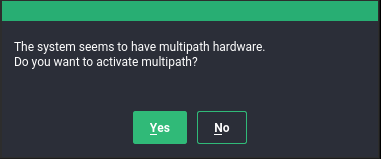
If you select “No” at this prompt (not recommended), the installation will proceed as in Section 4.1, “Installing without connected multipath devices”. In the partitioning stage, do not use/edit devices that will later be part of a multipath map.
If you select “Yes” at the multipath prompt,
multipathd will run during the installation. No device
will be added to the blacklist section of
/etc/multipath.conf, thus all SCSI and DASD devices,
including local disks, will appear as multipath devices in the partitioning
dialogs. After installation, all SCSI and DASD devices will be multipath
devices.
This procedure assumes that you installed on a local disk and enabled multipathing during installation, so that the root device is on multipath now.
Check your system for
/dev/mapper/...references to your local root device, and replace them with references that will still work if the device is not a multipath map anymore . If the following command finds no references, you do not need to apply changes:>sudogrep -rl /dev/mapper/ /etcSwitch to
by-uuidpersistent device policy fordracut:>echo 'persistent_policy="by-uuid"' | \ sudo tee /etc/dracut.conf.d/10-persistent-policy.confDetermine the WWID of the root device:
>multipathd show paths format "%i %d %w %s" 0:2:0:0 sda 3600605b009e7ed501f0e45370aaeb77f IBM,ServeRAID M5210 ...This command prints all paths devices with their WWIDs and vendor/product information. You will be able to identify the root device (here, the ServeRAID device) and note the WWID.
Create a blacklist entry in
/etc/multipath.confwith the WWID you just determined (do not apply these settings just yet):blacklist { wwid 3600605b009e7ed501f0e45370aaeb77f }Rebuild the initramfs:
>sudodracut -fReboot. Your system should boot with a non-multipath root disk.
The offline update of your system is similar to the fresh installation as
described in Section 4, “ Installing SUSE Linux Enterprise Server on multipath systems”. There is no
blacklist, so if the user selects to enable multipath,
the root device will appear as a multipath device, even if it is normally
not one. When dracut builds the initramfs during the update
procedure, it sees a different storage stack than it would see on the booted
system.
5 Multipath management tools #
The multipathing support in SUSE Linux Enterprise Server for SAP applications is based on the Device Mapper
Multipath module of the Linux kernel and the
multipath-tools user space package.
The generic multipathing capability is handled by the Device Mapper Multipath (DM-MP) module.
The packages multipath-tools and
kpartx provide tools that handle
automatic path discovery and grouping. The tools are the following:
multipathdThe daemon to set up and monitor multipath maps, and a command-line client to communicate with the daemon process.
multipathThe command-line tool for multipath operations.
kpartxThe command-line tool for managing “partitions” on multipath devices.
mpathpersistThe command-line tool for managing SCSI persistent reservations.
5.1 Device mapper multipath module #
The Device Mapper Multipath (DM-MP) module
dm-multipath.ko provides the generic multipathing
capability for Linux. DM-MPIO is the preferred solution for multipathing on
SUSE Linux Enterprise Server for SAP applications for SCSI and DASD devices, and can be used for NVMe devices
as well.
Since SUSE Linux Enterprise Server for SAP applications 15, native NVMe multipathing has been
recommended for NVMe and used by default. To disable native NVMe
multipathing and use device mapper multipath instead (not
recommended), boot with the kernel parameter
nvme-core.multipath=0.
The Device Mapper Multipath module handles the following tasks:
Distributing load over multiple paths inside the active path group.
Noticing I/O errors on path devices, and marking these as failed, so that no I/O will be sent to them.
Switching path groups when all paths in the active path group have failed.
Either failing or queuing I/O on the multipath device if all paths have failed, depending on configuration.
The following tasks are handled by the user-space components in the
multipath-tools package, not by the Device Mapper
Multipath module:
Discovering devices representing different paths to the same storage device and assembling multipath maps from them.
Collecting path devices with similar properties into path groups.
Monitoring path devices actively for failure or reinstantiation.
Monitoring of addition and removal of path devices.
The Device Mapper Multipath module does not provide an easy-to-use user interface for setup and configuration.
DM-MPIO protects against failures in the paths to the device, and not failures in the device itself, such as media errors. The latter kind of errors must be prevented by other means, such as replication.
5.2 The multipathd daemon #
multipathd is the most important part of a modern Linux
device mapper multipath setup. It is normally started through the systemd
service multipathd.service.
multipathd serves the following tasks (some of them
depend on the configuration):
On startup, detects path devices and sets up multipath maps from detected devices.
Monitors uevents and device mapper events, adding or removing path mappings to multipath maps as necessary and initiating failover or failback operations.
Sets up new maps on the fly when new path devices are discovered.
Checks path devices at regular intervals to detect failure, and tests failed paths to reinstate them if they become operational again.
When all paths fail,
multipathdeither fails the map, or switches the map device to queuing mode for a given time interval.Handles path state changes and switches path groups or regroups paths, as necessary.
Tests paths for “marginal” state, i.e. shaky fabrics conditions that cause path state flipping between operational and non-operational.
Handles SCSI persistent reservation keys for path devices if configured.
multipathd also serves as a command-line client to
process interactive commands by sending them to the running daemon. The
general syntax to send commands to the daemon is as follows:
>sudomultipathd COMMAND
or
>sudomultipathd -k'COMMAND'
There is also an interactive mode that allows sending multiple subsequent commands:
>sudomultipathd -k
Many multipathd commands have
multipath equivalents. For example, multipathd
show topology does the same thing as multipath
-ll. The notable difference is that the multipathd command
inquires the internal state of the running multipathd
daemon, whereas multipath obtains information directly from the kernel and
I/O operations.
If the multipath daemon is running, we recommend making modifications to
the system by using the multipathd commands. Otherwise,
the daemon may notice configuration changes and react to them. In some
situations, the daemon might even try to undo the applied changes.
multipath automatically delegates certain possibly
dangerous commands, like destroying and flushing maps, to
multipathd if a running daemon is detected.
The list below describes frequently used multipathd
commands:
- show topology
Shows the current map topology and properties.
- show paths
Shows the currently known path devices.
- show paths format "FORMAT STRING"
Shows the currently known path devices using a format string. Use
show wildcardsto see a list of supported format specifiers.- show maps
Shows the currently configured map devices.
- show maps format FORMAT STRING
Shows the currently configured map devices using a format string. Use
show wildcardsto see a list of supported format specifiers.- show config local
Shows the current configuration that multipathd is using.
- reconfigure
Rereads configuration files, rescans devices, and sets up maps again. This is basically equivalent to a restart of
multipathd. A few options cannot be modified without a restart. They are mentioned in the man pagemultipath.conf(5). Thereconfigurecommand reloads only map devices that have changed in some way. To force the reloading of every map device, usereconfigure all(available since SUSE Linux Enterprise Server 15 SP4; on previous versions,reconfigurereloaded every map).- del map MAP DEVICE NAME
Unconfigure and delete the given map device and its partitions. MAP DEVICE NAME can be a device node name like
dm-0, a WWID, or a map name. The command fails if the device is in use.- switchgroup map MAP DEVICE NAME group N
Switch to the path group with the given numeric index (starting at 1). This is useful for maps with manual failback.
Additional commands are available to modify path states, enable or disable
queuing, and more. See multipathd(8) for details.
5.3 The multipath command #
Even though multipath setup is mostly automatic and handled by
multipathd, multipath is still useful
for some administration tasks. Several examples of the command usage
follow:
- multipath
Detects path devices and configures all multipath maps that it finds.
- multipath -d
Similar to
multipath, but does not set up any maps (“dry run”).- multipath DEVICENAME
Configures a specific multipath device. DEVICENAME can denote a member path device by its device node name (
/dev/sdb) or device number inmajor:minorformat. Alternatively, it can be the WWID or name of a multipath map.- multipath -f DEVICENAME
Unconfigures ("flushes") a multipath map and its partition mappings. The command will fail if the map or one of its partitions is in use. See above for possible values of DEVICENAME.
- multipath -F
Unconfigures ("flushes") all multipath maps and their partition mappings. The command will fail for maps in use.
- multipath -ll
Displays the status and topology of all currently configured multipath devices.
- multipath -ll DEVICENAME
Displays the status of a specified multipath device. See above for possible values of DEVICENAME.
- multipath -t
Shows the internal hardware table and the active configuration of multipath. Refer to
multipath.conf(5)for details about the configuration parameters.- multipath -T
Has a similar function to the
multipath -tcommand but shows only hardware entries matching the hardware detected on the host.
The option -v controls the verbosity of the output. The
provided value overrides the verbosity option in
/etc/multipath.conf.
5.4 SCSI persistent reservations and mpathpersist #
The mpathpersist utility is used to manage SCSI
persistent reservations on Device Mapper Multipath devices. Persistent
reservations serve to restrict access to SCSI Logical Units to certain SCSI
initiators. In multipath configurations, it is important to use the same
reservation keys for all I_T nexuses (paths) for a given volume; otherwise,
creating a reservation on one path device would cause I/O errors on other
paths.
Use this utility with the reservation_key attribute in
the /etc/multipath.conf file to set persistent
reservations for SCSI devices. If (and only if) this option is set, the
multipathd daemon checks persistent reservations for
newly discovered paths or reinstated paths.
You can add the attribute to the defaults section or the
multipaths section of
multipath.conf. For example:
multipaths {
   multipath {
       wwid             3600140508dbcf02acb448188d73ec97d
       alias            yellow
        reservation_key  0x123abc
    }
}
After setting the reservation_key parameter for all
mpath devices applicable for persistent management, reload the
configuration using multipathd reconfigure.
reservation_key file”
If the special value reservation_key file is used in
the defaults section of
multipath.conf, reservation keys can be managed
dynamically in the file /etc/multipath/prkeys using
mpathpersist.
This is the recommended way to handle persistent reservations with multipath maps. It is available from SUSE Linux Enterprise Server for SAP applications 12 SP4.
Use the command mpathpersist to query and set persistent
reservations for multipath maps consisting of SCSI devices. Refer to the
manual page mpathpersist(8) for details. The
command-line options are the same as those of the
sg_persist from the sg3_utils
package. The sg_persist(8) manual page explains
the semantics of the options in detail.
In the following examples, DEVICE denotes a
device mapper multipath device like
/dev/mapper/mpatha. The commands below are listed with
long options for better readability. All options have single-letter
replacements, like in mpathpersist -oGS 123abc
DEVICE.
- mpathpersist --in --read-keys DEVICE
Read the registered reservation keys for the device.
- mpathpersist --in --read-reservation DEVICE
Show existing reservations for the device.
- mpathpersist --out --register --param-sark=123abc DEVICE
Register a reservation key for the device. This will add the reservation key for all I_T nexuses (path devices) on the host.
- mpathpersist --out --reserve --param-rk=123abc --prout-type=5 DEVICE
Create a reservation of type 5 (“write exclusive - registrants only”) for the device, using the previously registered key.
- mpathpersist --out --release --param-rk=123abc --prout-type=5 DEVICE
Release a reservation of type 5 for the device.
- mpathpersist --out --register-ignore --param-sark=0 DEVICE
Delete a previously existing reservation key from the device.
6 Configuring the system for multipathing #
Configuring the system for multipathing includes the following:
6.1 Enabling, starting, and stopping multipath services #
To enable multipath services to start at boot time, run the following command:
>sudosystemctl enable multipathd
To manually start the service in the running system, enter:
>sudosystemctl start multipathd
To restart the service, enter:
>sudosystemctl restart multipathd
In most situations, restarting the service is not necessary. To simply have
multipathd reload its configuration, run:
>sudosystemctl reload multipathd
To check the status of the service, enter:
>sudosystemctl status multipathd
To stop the multipath services in the current session, run:
>sudosystemctl stop multipathd multipathd.socket
Stopping the service does not remove existing multipath maps. To remove unused maps, run:
>sudomultipath -F

multipathd.service enabled
We strongly recommend keeping multipathd.service
always enabled and running on systems with multipath hardware. The service
does support systemd's socket activation mechanism, but
we do not recommend that you rely on that. Multipath maps will not be set up
during boot if the service is disabled.
If you need to disable multipath despite the warning above, for example, because a third-party multipathing software is going to be deployed, proceed as follows. Be sure that the system uses no hard-coded references to multipath devices.
To disable multipathing just for a single system
boot, use the kernel parameter
multipath=off. This affects both the booted system and
the initramfs, which does not need to be rebuilt in this case.
To disable multipathd services permanently, so that they will not be started on future system boots, run the following commands:
>sudosystemctl disable multipathd multipathd.socket>sudodracut --force --omit multipath
(Whenever you disable or enable the multipath services, rebuild the
initramfs.
If you want to make sure multipath devices do not get set up,
even when running multipath
manually, add the following lines at the end of
/etc/multipath.conf before rebuilding the initramfs:
blacklist {
         wwid .*
     }
6.2 Preparing SAN devices for multipathing #
Before configuring multipath I/O for your SAN devices, prepare the SAN devices, as necessary, by doing the following:
Configure and zone the SAN with the vendor’s tools.
Configure permissions for host LUNs on the storage arrays with the vendor’s tools.
If SUSE Linux Enterprise Server for SAP applications ships no driver for the host bus adapter (HBA), install a Linux driver from the HBA vendor. See the vendor’s specific instructions for more details.
If multipath devices are detected and
multipathd.service is enabled, multipath maps should
be created automatically.
lists some shell commands that can be used to examine the situation. When
the LUNs are not seen by the HBA driver, check the zoning setup in the SAN.
In particular, check whether LUN masking is active and whether the LUNs are
correctly assigned to the server.
If the HBA driver can see LUNs, but no corresponding block devices are created, additional kernel parameters may be needed. See TID 3955167: Troubleshooting SCSI (LUN) Scanning Issues in the SUSE Knowledge base at https://www.suse.com/support/kb/doc.php?id=3955167.
6.3 Partitions on multipath devices and kpartx #
Multipath maps can have partitions like their path devices. Partition table
scanning and device node creation for partitions is done in user space by
the kpartx tool. kpartx is
automatically invoked by udev rules; there is usually no need to run it
manually.
kpartx
The skip_kpartx option in
/etc/multipath.conf can be used to disable invocation
of kpartx on selected multipath maps. This may be
useful on virtualization hosts, for example.
Partition tables and partitions on multipath devices can be manipulated as
usual, using tools like fdisk or
parted. Changes applied to the partition table will be
noted by the system when the partitioning tool exits. If this does not work
(usually because a device is busy), try multipathd
reconfigure, or reboot the system.
6.4 Keeping the initramfs synchronized #
Make sure that the initial RAM file system (initramfs) and the booted system behave consistently regarding the use of multipathing for all block devices. Rebuild the initramfs after applying multipath configuration changes.
If multipathing is enabled in the system, it also needs to be enabled in
the initramfs and vice versa.
The multipath configuration must be synchronized between the booted system
and the initramfs. Therefore, if you change any of the files:
/etc/multipath.conf,
/etc/multipath/wwids,
/etc/multipath/bindings, or other configuration files,
or udev rules related to device identification, rebuild initramfs using the
command:
>sudodracut -f
If the initramfs and the system are not synchronized,
the system will not boot properly, and the start-up procedure may result in
an emergency shell.
Enabling or disabling multipathing in the initramfs
Special care must be taken if the initramfs is rebuilt in non-standard
situations, for example, from a rescue system or after booting with the
kernel parameter multipath=off.
dracut will automatically include multipathing support
in the initramfs if and only if it detects that the root file system is on
a multipath device while the initramfs is being built. In such cases, it
is necessary to enable or disable multipathing explicitly.
To enable multipath support in the initramfs, run the
command:
>sudodracut --force --add multipath
To disable multipath support in initramfs, run the
command:
>sudodracut --force --omit multipath
Persistent device names in the initramfs
When dracut generates the initramfs, it must refer to
disks and partitions to be mounted in a persistent manner, to make sure
the system will boot correctly. When dracut detects
multipath devices, it will use the DM-MP device names such as
/dev/mapper/3600a098000aad73f00000a3f5a275dc8-part1
for this purpose by default. This is good if the system
always runs in multipath mode. But if the system is
started without multipathing. Booting with such an
initramfs will fail, because the /dev/mapper devices
will not exist.
To prevent this from happening, change dracut's
persistent device naming policy by using the
--persistent-policy option. We recommend setting the
by-uuid use policy:
>sudodracut --force --omit multipath --persistent-policy=by-uuid
7 Modifying the multipath configuration #
The built-in multipath-tools defaults work well for
most setups. If customizations are needed, a configuration file needs to be
created. The main configuration file is
/etc/multipath.conf. In addition, files in
/etc/multipath/conf.d/ are taken into account.
Some storage vendors publish recommended values for multipath options in their documentation. These values often represent what the vendor has tested in their environment and found most suitable for the storage product.
multipath-tools has built-in defaults for many
storage arrays that are derived from the published vendor recommendations.
Run multipath -T to see the current settings for your
devices and compare them to vendor recommendations.
7.1 Creating /etc/multipath.conf #
It is recommended that you create a minimal
/etc/multipath.conf that just contains those settings
you want to change. In many cases, you do not need to create
/etc/multipath.conf at all.
If you prefer working with a configuration template that contains all possible configuration directives, run:
multipath -T >/etc/multipath.conf
7.2 multipath.conf syntax #
The /etc/multipath.conf file uses a hierarchy of
sections, subsections and option/value pairs.
White space separates tokens. Consecutive white space characters are collapsed into a single space, unless quoted (see below).
The hash (
#) and exclamation mark (!) characters cause the rest of the line to be discarded as a comment.Sections and subsections are started with a section name and an opening brace (
{) on the same line, and end with a closing brace (}) on a line on its own.Options and values are written on one line. Line continuations are unsupported.
Options and section names must be keywords. The allowed keywords are documented in
multipath.conf(5).Values may be enclosed in double quotes (
"). They must be enclosed in quotes if they contain white space or comment characters. A double quote character inside a value is represented by a pair of double quotes ("").The values of some options are POSIX regular expressions (see
regex(7)). They are case sensitive and not anchored, so “bar” matches “rhabarber”, but not “Barbie”.
The following example illustrates the syntax:
section {
    subsection {
        option1 value
        option2      "complex value!"
        option3    "value with ""quoted"" word"
    } ! subsection end
} # section end
Additional configuration files and precedence rules
After /etc/multipath.conf, the tools read files
matching the pattern /etc/multipath.conf.d/*.conf.
The additional files follow the same syntax rules as
/etc/multipath.conf. Sections and options can occur
multiple times. If the same option in the same
section is set in multiple files, or on multiple lines in the
same file, the last value takes precedence. Separate precedence rules
apply between multipath.conf sections. See below.
7.3 multipath.conf sections #
The /etc/multipath.conf file is organized into the
following sections. Some options can occur in more than one section. See
multipath.conf(5) for details.
- defaults
General default settings.
Important: Overriding built-in device propertiesBuilt-in hardware-specific device properties take precedence over the settings in the
defaultssection. Changes must therefore be made in thedevicessection or in theoverridessection.- blacklist
Lists devices to ignore.
- blacklist_exceptions
Lists devices to be multipathed even though they are matched by the blacklist.
- devices
Settings specific to the storage controller. This section is a collection of
devicesubsections. Values in this section override values for the same options in thedefaultssection, and the built-in settings ofmultipath-tools.deviceentries in thedevicessection are matched against the vendor and product of a device using regular expressions. These entries will be “merged”, setting all options from matching sections for the device. If the same option is set in multiple matchingdevicesections, the last device entry takes precedence, even if it is less “specific” than preceding entries. This applies also if the matching entries appear in different configuration files. In the following example, a deviceSOMECORP STORAGEwill usefast_io_fail_tmo 15.devices { device { vendor SOMECORP product STOR fast_io_fail_tmo 10 } device { vendor SOMECORP product .* fast_io_fail_tmo 15 } }- multipaths
Settings for individual multipath devices. This section is a list of
multipathsubsections. Values override thedefaultsanddevicessections.- overrides
Settings that override values from all other sections.
7.4 Applying multipath.conf modifications #
To apply the configuration changes, run:
>sudomultipathd reconfigure
Do not forget to synchronize with the configuration in the initramfs.
multipath
Do not apply new settings with the multipath command
while multipathd is running. This may result in an
inconsistent and possibly broken setup.
It is possible to test modified settings first before they are applied, by running:
>sudomultipath -d -v2
This command shows new maps to be created with the proposed topology, but not whether maps will be removed/flushed. To obtain more information, run with increased verbosity:
>sudomultipath -d -v3 2>&1 | less
8 Configuring policies for failover, queuing, and failback #
The goal of multipath I/O is to provide connectivity fault tolerance between the storage system and the server. The desired default behavior depends on whether the server is a stand-alone server or a node in a high-availability cluster.
This section discusses the most important
multipath-tools configuration parameters for
achieving fault tolerance.
- polling_interval
The time interval (in seconds) between health checks for path devices. The default is 5 seconds. Failed devices are checked at this time interval. For healthy devices, the time interval may be increased up to
max_polling_intervalseconds.- detect_checker
If this is set to
yes(default, recommended),multipathdautomatically detects the best path checking algorithm.- detect_checker
If this is set to
yes(default, recommended),multipathdautomatically detects the best path checking algorithm.- path_checker
The algorithm used to check path state. If you need to enable the checker, disable
detect_checkeras follows:defaults { detect_checker no }The following list contains only the most important algorithms. See
multipath.conf(5)for the full list.- tur
Send TEST UNIT READY command. This is the default for SCSI devices with ALUA support.
- directio
Read a device sector using asynchronous I/O (aio).
- rdac
Device-specific checker for NetAPP E-Series and similar arrays.
- none
No path checking is performed.
- checker_timeout
If a device does not respond to a path checker command in the given time, it is considered failed. The default is the kernel's SCSI command timeout for the device (usually 30 seconds).
- fast_io_fail_tmo
If an error on the SCSI transport layer is detected (for example on a Fibre Channel remote port), the kernel transport layer waits for this amount of time (in seconds) for the transport to recover. After that, the path device fails with “transport offline” state. This is very useful for multipath, because it allows a quick path failover for a frequently occurring class of errors. The value must match typical time scale for reconfiguration in the fabric. The default value of 5 seconds works well for Fibre Channel. Other transports, like iSCSI, may require longer timeouts.
- dev_loss_tmo
If a SCSI transport endpoint (for example a Fibre Channel remote port) is not reachable any more, the kernel waits for this amount of time (in seconds) for the port to reappear until it removes the SCSI device node for good. Device node removal is a complex operation which is prone to race conditions or deadlocks and should best be avoided. We therefore recommend setting this to a high value. The special value
infinityis supported. The default is 10 minutes. To avoid deadlock situations,multipathdensures that I/O queuing (seeno_path_retry) is stopped beforedev_loss_tmoexpires.- no_path_retry
Determine what happens if all paths of a given multipath map have failed. The possible values are:
- fail
Fail I/O on the multipath map. This will cause I/O errors in upper layers such as mounted file systems. The affected file systems, and possibly the entire host, will enter degraded mode.
- queue
I/O on the multipath map is queued in the device mapper layer and sent to the device when path devices become available again. This is the safest option to avoid losing data, but it can have negative effects if the path devices do not get reinstated for a long time. Processes reading from the device will hang in uninterruptible sleep (
D) state. Queued data occupies memory, which becomes unavailable for processes. Eventually, memory will be exhausted.- N
N is a positive integer. Keep the map device in queuing mode for N polling intervals. When the time elapses,
multipathdfails the map device. Ifpolling_intervalis 5 seconds andno_path_retryis 6,multipathdwill queue I/O for approximately 6 * 5s = 30s before failing I/O on the map device.
- flush_on_last_del
If set to
yesand all path devices of a map are deleted (as opposed to just failed), fail all I/O in the map before removing it. The default isno.- deferred_remove
If set to
yesand all path devices of a map are deleted, wait for holders to close the file descriptors for the map device before flushing and removing it. If paths reappear before the last holder closed the map, the deferred remove operation will be cancelled. The default isno.- failback
If a failed path device in an inactive path group recovers,
multipathdreevaluates the path group priorities of all path groups. After the reevaluation, the highest-priority path group may be one of the currently inactive path groups. This parameter determines what happens in this situation.Important: Observe vendor recommendationsThe optimal failback policy depends on the property of the storage device. It is therefore strongly encouraged to verify
failbacksettings with the storage vendor.- manual
Nothing happens unless the administrator runs a
multipathd switchgroup.- immediate
The highest-priority path group is activated immediately. This is often beneficial for performance, especially on stand-alone servers, but it should not be used for arrays on which the change of the path group is a costly operation.
- followover
Like
immediate, but only perform failback when the path that has just become active is the only healthy path in its path group. This is useful for cluster configurations: It keeps a node from automatically failing back when another node requested a failover before.- N
N is a positive integer. Wait for N polling intervals before activating the highest priority path group. If the priorities change again during this time, the wait period starts anew.
- eh_deadline
Set an approximate upper limit for the time (in seconds) spent in SCSI error handling if devices are unresponsive and SCSI commands time out without error response. When the deadline has elapsed, the kernel will perform a full HBA reset.
After modifying the /etc/multipath.conf file, apply
your settings.
8.1 Queuing policy on stand-alone servers #
When you configure multipath I/O for a stand-alone server, a
no_path_retry setting with value
queue protects the server operating system from
receiving I/O errors as long as possible. It queues messages until a
multipath failover occurs. If “infinite” queuing is not desired
(see above), select a numeric value that is deemed high enough for the
storage paths to recover under ordinary circumstances (see above).
8.2 Queuing policy on clustered servers #
When you configure multipath I/O for a node in a high-availability cluster,
you want multipath to report the I/O failure to trigger the resource
failover instead of waiting for a multipath failover to be resolved. In
cluster environments, you must modify the no_path_retry
setting so that the cluster node receives an I/O error in
relation to the cluster verification process (recommended to be 50% of the
heartbeat tolerance) if the connection is lost to the storage system. In
addition, you want the multipath failback to be set to
manual or followover to avoid a
ping-pong of resources because of path failures.
9 Configuring path grouping and priorities #
Path devices in multipath maps are grouped in path
groups, also called priority groups. Only
one path group receives I/O at any given time. multipathd
assigns priorities to path groups.
Out of the path groups with active paths, the group with the highest priority is activated
according to the configured failback policy for the map.
The priority of a path group is the average of the priorities of the active
path devices in the path group. The priority of a path device is an integer
value calculated from the device properties (see the description of the
prio option below).
This section describes the multipath.conf configuration
parameters relevant for priority determination and path grouping.
- path_grouping_policy
Specifies the method used to combine paths into groups. Only the most important policies are listed here; see
multipath.conf(5)for other less frequently used values.- failover
One path per path group. This setting is useful for traditional “active/passive” storage arrays.
- multibus
All paths in one path group. This is useful for traditional “active/active” arrays.
- group_by_prio
Path devices with the same path priority are grouped together. This option is useful for modern arrays that support asymmetric access states, like ALUA. Combined with the
aluaorsysfspriority algorithms, the priority groups set up bymultipathdwill match the primary target port groups that the storage array reports through ALUA-related SCSI commands.
Using the same policy names, the path grouping policy for a multipath map can be changed temporarily with the command:
>sudomultipath -p POLICY_NAME MAP_NAME- marginal_pathgroups
If set to
onorfpin, “marginal” path devices are sorted into a separate path group. This is independent of the path grouping algorithm in use.- detect_prio
If this is set to
yes(default, recommended),multipathdautomatically detects the best algorithm to set the priority for a storage device and ignores thepriosetting. In practice, this means using thesysfsprio algorithm if ALUA support is detected.- prio
Determines the method to derive priorities for path devices. If you override this, disable
detect_prioas follows:defaults { detect_prio no }The following list contains only the most important methods. Several other methods are available, mainly to support legacy hardware. See
multipath.conf(5)for the full list.- alua
Uses SCSI-3 ALUA access states to derive path priority values. The optional
exclusive_pref_bitargument can be used to change the behavior for devices that have the ALUA “preferred primary target port group” (PREF) bit set:prio alua prio_args exclusive_pref_bitIf this option is set, “preferred” paths get a priority bonus over other active/optimized paths. Otherwise, all active/optimized paths are assigned the same priority.
- sysfs
Like
alua, but instead of sending SCSI commands to the device, it obtains the access states fromsysfs. This causes less I/O load thanalua, but is not suitable for all storage arrays with ALUA support.- const
Uses a constant value for all paths.
- path_latency
Measures I/O latency (time from I/O submission to completion) on path devices, and assigns higher priority to devices with lower latency. See
multipath.conf(5)for details. This algorithm is still experimental.- weightedpath
Assigns a priority to paths based on their name, serial number, Host:Bus:Target:Lun ID (HBTL), or Fibre Channel WWN. The priority value does not change over time. The method requires a
prio_argsargument, seemultipath.conf(5)for details. For example:prio weightedpath prio_args "hbtl 2:.*:.*:.* 10 hbtl 3:.*:.*:.* 20 hbtl .* 1"This assigns devices on SCSI host 3 a higher priority than devices on SCSI host 2, and all others a lower priority.
- prio_args
Some
prioalgorithms require extra arguments. These are specified in this option, with syntax depending on the algorithm. See above.- hardware_handler
The name of a kernel module that the kernel uses to activate path devices when switching path groups. This option has no effect with recent kernels because hardware handlers are autodetected.
- path_selector
The name of a kernel module that is used for load balancing between the paths of the active path group. The available choices depend on the kernel configuration. For historical reasons, the name must always be enclosed in quotes and followed by a “0” in
multipath.conf, like this:path_selector "queue-length 0"
- service-time
Estimates the time pending I/O will need to complete on all paths, and selects the path with the lowest value. This is the default.
- historical-service-time
Estimates future service time based on the historical service time (about which it keeps a moving average) and the number of outstanding requests. Estimates the time pending I/O will need to complete on all paths, and selects the path with the lowest value.
- queue-length
Selects the path with the lowest number of currently pending I/O requests.
- round-robin
Switches paths in round-robin fashion. The number of requests submitted to a path before switching to the next one can be adjusted with the options
rr_min_io_rqandrr_weight.- io-affinity
This path selector currently does not work with
multipath-tools.
After modifying the /etc/multipath.conf file, apply
your settings.
10 Selecting devices for multipathing #
On systems with multipath devices, you might want to avoid setting up
multipath maps on some devices (typically local disks).
multipath-tools offers various means for
configuring which devices should be considered multipath path devices.
In general, there is nothing wrong with setting up “degraded” multipath maps with just a single device on top of local disks. It works fine and requires no extra configuration. However, some administrators find this confusing or generally oppose this sort of unnecessary multipathing. Also, the multipath layer causes a slight performance overhead.
After modifying the /etc/multipath.conf file, apply
your settings.
10.1 The blacklist section in multipath.conf #
The /etc/multipath.conf file can contain a
blacklist section that lists all devices that should be
ignored by multipathd and multipath.
The following example illustrates possible ways of excluding devices:
blacklist {
       wwid 3600605b009e7ed501f0e45370aaeb77f 1
       device {  2
           vendor ATA
           product .*
       }
       protocol scsi:sas 3
       property SCSI_IDENT_LUN_T10 4
       devnode "!^dasd[a-z]*" 5
   }
| |
This | |
Excluding by
This form is supported since SLES for SAP 15 SP1 and SLES for SAP 12 SP5. | |
This | |
Excluding devices by
The example illustrates special syntax that is only supported in the
|
By default, multipath-tools ignores all devices
except SCSI, DASD or NVMe. Technically, the built-in devnode exclude list
is this negated regular expression:
devnode !^(sd[a-z]|dasd[a-z]|nvme[0-9])
10.2 The blacklist exceptions section in multipath.conf #
Sometimes, it is desired to configure only very specific devices for
multipathing. In this case, devices are excluded by default, and exceptions
are defined for devices that should be part of a multipath map. The
blacklist_exceptions section exists for this purpose. It
is typically used like in the following example, which excludes everything
except storage with product string “NETAPP”:
blacklist {
      wwid .*
 }
 blacklist_exceptions {
      device {
          vendor ^NETAPP$
          product .*
      }
 }
The blacklist_exceptions section supports all methods
described for the blacklist section above.
The property directive in
blacklist_exceptions is mandatory because every device
must have at least one of the “allowed”
udev properties to be considered a path device for multipath (the value of
the property does not matter). The built-in default for
property is
property (SCSI_IDENT_|ID_WWN)
Only devices that have at least one udev property matching this regular expression will be included.
10.3 Other options affecting device selection #
Besides the blacklist options, there are several other
settings in /etc/multipath.conf that affect which
devices are considered multipath path devices.
- find_multipaths
This option controls the behavior of
multipathandmultipathdwhen a device that is not excluded is first encountered. The possible values are:- greedy
Every device non-excluded by
blacklistin/etc/multipath.confis included. This is the default on SUSE Linux Enterprise. If this setting is active, the only way to prevent devices from being added to multipath maps is setting them as excluded.- strict
Every device is excluded, even if it is not present in the
blacklistsection of/etc/multipath.conf, unless its WWID is listed in the file/etc/multipath/wwids. It requires manual maintenance of the WWIDs file (see note below).- yes
Devices are included if they meet the conditions for
strict, or if at least one other device with the same WWID exists in the system.- smart
If a new WWID is first encountered, it is temporarily marked as multipath path device.
multipathdwaits for some time for additional paths with the same WWID to appear. If this happens, the multipath map is set up as usual. Otherwise, when the timeout expires, the single device is released to the system as a non-multipath device. The timeout is configurable with the optionfind_multipaths_timeout.This option depends on
systemdfeatures which are only available on SUSE Linux Enterprise Server 15.
Note: Maintaining/etc/multipath/wwidsmultipath-toolskeeps a record of previously setup multipath maps in the file/etc/multipath/wwids(the “WWIDs file”). Devices with WWIDs listed in this file are considered multipath path devices. The file is important for multipath device selection for all values offind_multipathsexceptgreedy.If
find_multipathsis set toyesorsmart,multipathdadds WWIDs to/etc/multipath/wwidsafter setting up new maps, so that these maps will be detected more quickly in the future.The WWIDs file can be manually modified:
>sudomultipath -a 3600a098000aad1e3000064e45f2c2355 1>sudomultipath -w /dev/sdf 2In the
strictmode, this is the only way to add new multipath devices. After modifying the WWIDs file, runmultipathd reconfigureto apply the changes. We recommend rebuilding the initramfs after applying changes to the WWIDs file.- allow_usb_devices
If this option is set to
yes, USB storage devices are considered for multipathing. The default isno.
11 Multipath device names and WWIDs #
multipathd and multipath internally
use WWIDs to identify devices. WWIDs are also used as map names by default.
For convenience, multipath-tools supports assigning
simpler, more easily memorizable names to multipath devices.
11.1 WWIDs and device Identification #
It is crucial for multipath operation to reliably detect devices that
represent paths to the same storage volume.
multipath-tools uses the device's World Wide
Identification (WWID) for this purpose (sometimes also referred to as
Universally Unique ID (UUID) or Unique ID (UID—do not confuse with
“User ID”)). The WWID of a map device is always the same as the
WWID of its path devices.
By default, WWIDs of path devices are inferred from udev properties of the devices, which are determined in udev rules, either by reading device attributes from the sysfs file system or by using specific I/O commands. To see the udev properties of a device, run:
> udevadm info /dev/sdx
The udev properties used by multipath-tools to
derive WWIDs are:
ID_SERIALfor SCSI devices (do not confuse this with the device's “serial number”)ID_UIDfor DASD devicesID_WWNfor NVMe devices
It is impossible to change the WWID of a multipath map which is in use. If the WWID of mapped path devices changes because of a configuration change, the map needs to be destroyed, and a new map needs to be set up with the new WWID. This cannot be done while the old map is in use. In extreme cases, data corruption may result from WWID changes. It must therefore be strictly avoided to apply configuration changes that would cause map WWIDs to change.
uid_attrs option in
/etc/multipath.conf.
11.2 Setting aliases for multipath maps #
Arbitrary map names can be set in the multipaths section
of /etc/multipath.conf as follows:
multipaths {
    multipath {
        wwid 3600a098000aad1e3000064e45f2c2355
        alias postgres
    }
}
Aliases are expressive, but they need to be assigned to each map individually, which may be cumbersome on large systems.
11.3 Using autogenerated user-friendly names #
multipath-tools also supports autogenerated
aliases, so-called “user-friendly names”. The naming scheme of
the aliases follows the pattern: mpathINDEX,
where INDEX is a lower case letter (starting
with a). So the first autogenerated alias is
mpatha, the next one is mpathb,
mpathc to mpathz. After that follows
mpathaa, mpathab, and so on.
Map names are only useful if they are persistent.
multipath-tools keeps track of the assigned names
in the file /etc/multipath/bindings (the
“bindings file”). When a new map is created, the WWID is first
looked up in this file. If it is not found, the lowest available
user-friendly name is assigned to it.
Explicit aliases take precedence over user-friendly names.
The following options in /etc/multipath.conf affect
user-friendly names:
- user_friendly_names
If set to
yes, user-friendly names are assigned and used. Otherwise, the WWID is used as a map name unless an alias is configured.- alias_prefix
The prefix used to create user-friendly names,
mpathby default.
For cluster operations, device names must be identical across all nodes in
the cluster. The multipath-tools configuration
must be kept synchronized between nodes. If
user_friendly_names is used,
multipathd may modify the
/etc/multipath/bindings file at runtime. Such
modifications must be replicated dynamically to all nodes. The same
applies to /etc/multipath/wwids.
It is possible to change map names at runtime. Use any of the methods
described in this section and run multipathd
reconfigure, and the map names will change without disrupting
the system operation.
11.4 Referring to multipath maps #
Technically, multipath maps are Device Mapper devices, which have generic
names of the form /dev/dm-n
with an integer number n. These names are not
persistent. They should never be used to refer to the
multipath maps. udev creates various symbolic links to
these devices, which are more suitable as persistent references. These
links differ with respect to their invariance against certain configuration
changes. The following typical example shows various symlinks all pointing
to the same device.
/dev/disk/by-id/dm-name-mpathb1 -> ../../dm-1
/dev/disk/by-id/dm-uuid-mpath-3600a098000aad73f00000a3f5a275dc82 -> ../../dm-1
/dev/disk/by-id/scsi-3600a098000aad73f00000a3f5a275dc83 -> ../../dm-1
/dev/disk/by-id/wwn-0x600a098000aad73f00000a3f5a275dc84 -> ../../dm-1
/dev/mapper/mpathb5 -> ../dm-1
These two links use the map name to refer to the map. Thus, the links will change if the map name changes, for example, if you enable or disable user-friendly names. | |
This link uses the device mapper UUID, which is the WWID used by
The device mapper UUID is the preferred form to ensure that
only multipath devices are referenced. For example,
the following line in filter = [ "a|/dev/disk/by-id/dm-uuid-mpath-.*|", "r|.*|" ] | |
These are links that would normally point to path devices. The multipath
device took them over, because it has a higher udev link priority (see
|
For partitions on multipath maps created
by the kpartx tool, there are similar symbolic links,
derived from the parent device name or WWID and the partition number:
/dev/disk/by-id/dm-name-mpatha-part2 -> ../../dm-5
/dev/disk/by-id/dm-uuid-part2-mpath-3600a098000aad1e300000b4b5a275d45 -> ../../dm-5
/dev/disk/by-id/scsi-3600a098000aad1e300000b4b5a275d45-part2 -> ../../dm-5
/dev/disk/by-id/wwn-0x600a098000aad1e300000b4b5a275d45-part2 -> ../../dm-5
/dev/disk/by-partuuid/1c2f70e0-fb91-49f5-8260-38eacaf7992b -> ../../dm-5
/dev/disk/by-uuid/f67c49e9-3cf2-4bb7-8991-63568cb840a4 -> ../../dm-5
/dev/mapper/mpatha-part2 -> ../dm-5
Note that partitions often have by-uuid links, too,
referring not to the device itself but to the file system it contains.
These links are often preferable. They are invariant even if the file
system is copied to a different device or partition.
When dracut builds an initramfs, it creates hard-coded
references to devices in the initramfs, using
/dev/mapper/$MAP_NAME references by default. These
hard-coded references will not be found during boot if the map names used
in the initramfs do not match the names used during building the
initramfs, causing boot failure. Normally this will not happen, because
dracut will add all multipath configuration files to
the initramfs. But problems can occur if the initramfs is built from a
different environment, for example, in the rescue system or during an
offline update. To prevent this boot failure, change
dracut's persistent_policy setting.
12 Miscellaneous options #
This section lists some useful multipath.conf options
that were not mentioned so far. See
multipath.conf(5) for a full list.
- verbosity
Controls the log verbosity of both
multipathandmultipathd. The command-line option-voverrides this setting for both commands. The value can be between 0 (only fatal errors) and 4 (verbose logging). The default is 2.- uid_attrs
This option enables an optimization for processing udev events, so-called “uevent merging”. It is useful in environments in which hundreds of path devices may fail or reappear simultaneously. In order to make sure that path WWIDs do not change, the value should be set exactly like this:
defaults { uid_attrs "sd:ID_SERIAL dasd:ID_UID nvme:ID_WWN" }- skip_kpartx
If set to
yesfor a multipath device (default isno), do not create partition devices on top of the given device. Useful for multipath devices used by virtual machines. Previous SUSE Linux Enterprise Server for SAP applications releases achieved the same effect with the parameter “features 1 no_partitions”.- max_sectors_kb
Limits the maximum amount of data sent in a single I/O request for all path devices of the multipath map.
- ghost_delay
On active/passive arrays, it can happen that passive paths (in “ghost” state) are probed before active paths. If the map was activated immediately and I/O was sent, this would cause a possibly costly path activation. This parameter specifies the time (in seconds) to wait for active paths of the map to appear before activating the map. The default is
no(no ghost delay).- recheck_wwid
If set to
yes(default isno), double-checks the WWID of restored paths after failure, and removes them if the WWID has changed. This is a safety measure against data corruption.- enable_foreign
multipath-toolsprovides a plugin API for other multipathing backends than Device Mapper multipath. The API supports monitoring and displaying information about the multipath topology using standard commands likemultipath -ll. Modifying the topology is unsupported.The value of
enable_foreignis a regular expression to match against foreign library names. The default value is “NONE”.SUSE Linux Enterprise Server for SAP applications ships the
nvmeplugin, which adds support for the native NVMe multipathing. To enable thenvmeplugin, setdefaults { enable_foreign nvme }
12.1 Handling unreliable (“marginal”) path devices #
Unstable conditions in the fabric can cause path devices to behave
erratically. They exhibit frequent I/O errors, recover, and fail again.
Such path devices are also denoted “marginal” or
“shaky” paths. This section summarizes the options that
multipath-tools provides to deal with this
problem.
If a path device exhibits a second failure (good → bad transition) before
marginal_path_double_failed_time elapses after the
first failure, multipathd starts monitoring the path at
a rate of 10 requests per second, for a monitoring period of
marginal_path_err_sample_time. If the error rate during
the monitoring period exceeds
marginal_path_err_rate_threshold, the path is
classified as marginal. After
marginal_path_err_recheck_gap_time, the path
transitions to normal state again.
This algorithm is used if all four numeric
marginal_path_ parameters are set to a positive value,
and marginal_pathgroups is not set to
fpin. It is available since SUSE Linux Enterprise Server 15 SP1 and
SUSE Linux Enterprise Server 12 SP5.
- marginal_path_double_failed_time
Maximum time (in seconds) between two path failures that triggers path monitoring.
- marginal_path_err_sample_time
Length (in seconds) of the path monitoring interval.
- marginal_path_err_rate_threshold
Minimum error rate (per thousand I/Os).
- marginal_path_err_recheck_gap_time
Time (in seconds) to keep the path in marginal state.
- marginal_pathgroups
This option is available since SLES for SAP 15SP3. Possible values are:
- off
Marginal state is determined by
multipathd(see above). Marginal paths are not reinstated as long as they remain in marginal state. This is the default, and the behavior in SUSE Linux Enterprise Server releases before SP3, where themarginal_pathgroupsoption was unavailable.- on
Similar to the
offoption, but instead of keeping them in the failed state, marginal paths are moved to a separate path group, which will be assigned a lower priority than all other path groups. Paths in this path group will only be used for I/O if all paths in other path groups have failed.- fpin
This setting is available from SLES for SAP 15SP4. Marginal path state is derived from FPIN events (see below). Marginal paths are moved into a separate path group, as described for
off. This setting requires no further host-side configuration. It is the recommended way to handle marginal paths on Fibre Channel fabrics that support FPIN.Note: FPIN-based marginal path detectionmultipathdlistens for Fibre Channel Performance Impact Notifications (FPIN). If an FPIN-LI (Link Integrity) event is received for a path device, the path will enter marginal state. This state will last until a RSCN or Link up event is received on the Fibre channel adapter the device is connected to.
A simpler algorithm using the parameters
san_path_err_threshold,
san_path_err_forget_rate, and
san_path_err_recovery time is also available and
recommended for SUSE Linux Enterprise Server 15 (GA). See the “Shaky paths
detection” section in multipath.conf(5).
13 Multipath best practices #
Multipath best practices include the following:
13.1 Best practices for configuration #
The large number of configuration directives is daunting at first. Usually, you can get good results with an empty configuration, unless you are in a clustering environment.
Here are some general recommendations for stand-alone servers. They are not mandatory. See the documentation of the respective parameters in the previous sections for background information.
defaults {
   deferred_remove      yes
   find_multipaths      smart
   enable_foreign       nvme
   marginal_pathgroups  fpin    # 15.4 only, if supported by fabric
}
devices {
   # A catch-all device entry.
   device {
       vendor                .*
       product               .*
       dev_loss_tmo          infinity
       no_path_retry         60            # 5 minutes
       path_grouping_policy  group_by_prio
       path_selector         "historical-service-time 0"
       reservation_key       file          # if using SCSI persistent reservations
   }
   # Follow up with specific device entries below, they will take precedence.
}
After modifying the /etc/multipath.conf file, apply
your settings.
13.2 Interpreting multipath I/O status #
For a quick overview of the multipath subsystem, use multipath
-ll or multipathd show topology. The output of
these commands has the same format. The former command reads the kernel
state, while the latter prints the status of the multipath daemon. Normally
both states are equal. Here is an example of the output:
>sudomultipathd show topology mpatha1 (3600a098000aad1e300000b4b5a275d452) dm-03 NETAPP,INF-01-004 size=64G features='3 queue_if_no_path pg_init_retries 50'5 hwhandler='1 alua'6 wp=rw7 |-+- 8policy='historical-service-time 2'9 prio=5010 status=active11 | |-12 3:0:0:113 sdb 8:1614 active15 ready16 running17 | `- 4:0:0:1 sdf 8:80 active ready running `-+- policy='historical-service-time 2' prio=10 status=enabled `- 4:0:1:1 sdj 8:144 active ready running
The map name. | |
The map WWID (if different from the map name). | |
The device node name of the map device. | |
The vendor and product name. | |
A path group. The indented lines below the path group list the path devices that belong to it. | |
The path selector algorithm used by the path group. The "2" can be ignored. | |
The priority of the path group. | |
The status of the path group ( | |
A path device. | |
The bus ID of the device (here, a SCSI Host:Bus:Target:Lun ID). | |
The device node name and major/minor number of the path device. | |
The kernel device mapper state of the path ( | |
The multipath path device state (see below). | |
The state of the path device in the kernel. This is a device-type
specific value. For SCSI, it is either |
The multipath path device states are:
|
|
The path is healthy and up |
|
|
A passive path in an active/passive array |
|
|
The path is down or unreachable |
|
|
A checker command timed out |
|
|
Waiting for the completion of a path checker command |
|
|
Path reinstantiation is delayed to avoid "flapping" |
|
|
An unreliable path (emc path checker only) |
13.3 Using LVM2 on multipath devices #
LVM2 has built-in support for detecting multipath devices. It is activated
by default in /etc/lvm/lvm.conf:
multipath_component_detection=1
This works reliably only if LVM2 is also configured to obtain information about device properties from udev:
external_device_info_source="udev"
This is the default in SUSE Linux Enterprise 15 SP4, but not in earlier releases. It is also possible (although normally not necessary) to create a filter expression for LVM2 to ignore all devices except multipath devices.
13.4 Resolving stalled I/O #
If all paths fail concurrently and I/O is queued, applications may stall for a long time. To resolve this, you can use the following procedure:
Enter the following command at a terminal prompt:
>sudomultipathd disablequeueing map MAPNAMEReplace
MAPNAMEwith the correct WWID or mapped alias name for the device.This command immediately causes all queued I/O to fail and propagates the error to the calling application. File systems will observe I/O errors and switch to read-only mode.
Reactivate queuing by entering the following command:
>sudomultipathd restorequeueing MAPNAME
13.5 MD RAID on multipath devices #
MD RAID arrays on top of multipathing are set up automatically by the
system's udev rules. No special configuration in
/etc/mdadm.conf is necessary.
13.6 Scanning for new devices without rebooting #
If your system has already been configured for multipathing and you need to
add storage to the SAN, you can use the
rescan-scsi-bus.sh script to scan for the new devices.
The general syntax for the command follows:
>sudorescan-scsi-bus.sh [-a] [-r] --hosts=2-3,5
Where the options have the following meaning:
- -a
the option ensures that all SCSI targets are scanned, otherwise only already existing targets will be scanned for new LUNs.
- -r
the option enables the removal of devices which have been removed on the storage side.
- --hosts
the option specifies the list of host bus adapters to scan (the default is to scan all).
Run rescan-scsi-bus.sh --help for help on additional
options.
If multipathd is running and new SAN devices are
discovered, they should be automatically set up as multipath maps according
to the configuration.
In EMC PowerPath environments, do not use the
rescan-scsi-bus.sh utility provided with the
operating system or the HBA vendor scripts for scanning the SCSI buses. To
avoid potential file system corruption, EMC requires that you follow the
procedure provided in the vendor documentation for EMC PowerPath for
Linux.
14 Multipath troubleshooting #
If a system runs into emergency mode on a system with multipath, printing messages about missing devices, the reason is almost always one of these:
Inconsistent configuration of multipath device selection
Use of non-existing device references
14.1 Understanding device selection issues #
A block device can only either be part of a multipath map or be used
directly (mounted as file system, used as swap, LVM physical volume, or
otherwise). If a device is already mounted, an attempt by multipathd to
make it part of a multipath map will fail with a “Device or resource
busy” error. Vice-versa, the same error results if
systemd attempts to mount a device that has already
been made part of a multipath map.
Storage device activation during boot is handled by a complex interaction
between systemd, udev,
multipathd and some other tools.
udev rules play a central role. They set device
properties that indicate to other subsystems how a device should be used.
The multipath-related udev rules set the following properties for devices
that are selected for multipathing:
SYSTEMD_READY=0
 DM_MULTIPATH_DEVICE_PATH=1
Partition devices inherit these properties from their parents.
If these properties are not set correctly, if some tool does not respect
them, or if they get set too late, a race condition between
multipathd and some other subsystem may result. Only one
of the contenders can win the race; the other one will see a “Device
or resource busy” error.
One problem in this context is that the tools of the LVM2 suite do not evaluate udev properties by default. They rely on their own logic for determining whether a device is a multipath component, which sometimes does not match the logic of the rest of the system.
Consider a system with multipathing where the root device is not
multipathed, and no devices are excluded from multipath. The root file
system is mounted in the initramfs. systemd switches to
the root file system and multipathd starts up. Because
the device is already mounted, multipathd fails to set
up the multipath map for it. Because the root device is not configured in
blacklist, it is considered a multipath device, and
SYSTEMD_READY=0 is set for it.
Later in the boot process, the system attempts to mount additional file
systems like /var and /home.
Usually, these file systems will be on the same device as the root file
system, by default as BTRFS subvolumes of the root file system itself. But
systemd cannot mount them because of SYSTEMD_READY=0.
We are in a deadlock: The dm-multipath device cannot
be created, and the underlying device is blocked for systemd. The
additional file systems cannot be mounted, resulting in boot failure.
A solution to this problem already
exists. multipathd detects this situation
and releases the device to systemd which can then
proceed mounting the file system. However, it is important to understand
the general problem, which can still occur in more subtle ways.
14.2 Understanding device referencing issues #
Typically, there are multiple symbolic links pointing to a device node.
But these links do not always
exist; udev creates them according to the current udev
rules. For example, if multipathing is off, symbolic links under
/dev/mapper/ for multipath devices will be missing.
Thus, any reference to a /dev/mapper/ device will
fail.
Such references can appear in various places, notably in
/etc/fstab and /etc/crypttab, in
the initramfs, or even on the kernel command line.
The safest way to circumvent this problem is to avoid using the kind of
device references that are not persistent between boots or depend on system
configuration. We generally recommend referring to file systems (and
similar entities like swap space) by properties of the file system itself
(like UUID or label) rather than the containing device. If such references
are not available and device references are required, for example, in
/etc/crypttab, the options should be evaluated
carefully.
14.3 Troubleshooting steps in emergency mode #
As there are many error situations that differ in subtle ways, it is impossible to provide a step-by-step recovery guide. But with the background knowledge from the previous subsections, you should be able to figure out the problem if a system runs into emergency mode because of multipathing issues. Before you begin debugging, make sure you have checked the following questions:
Is the multipath service enabled?
Is the multipath dracut module included in the initramfs?
Is my root device configured as a multipath device? If not, is the root device properly excluded from multipath, or are you relying on the absence of the multipath module in the initramfs?
Does the system enter emergency mode before or after switching to the real root file system?
If you are unsure with respect to the last question, here is a sample dracut emergency prompt as it would be printed before switching root:
Generating "/run/initramfs/rdsosreport.txt"
Entering emergency mode. Exit the shell to continue.
Type "journalctl" to view system logs.

You might want to save "/run/initramfs/rdsosreport.txt" to a USB stick or /boot
after mounting them and attach it to a bug report.

Give root password for maintenance
(or press Control-D to continue):
The mention of rdsosreport.txt is a clear indication
that the system is still running from the initramfs. If you are still
uncertain, log in and check for the existence of the file
/etc/initrd-release. This file exists only in an
initramfs environment.
If emergency mode is entered after switching root, the emergency prompt
looks similar, but rdsosreport.txt is not mentioned:
Timed out waiting for device dev-disk-by\x2duuid-c4a...cfef77d.device.
[DEPEND] Dependency failed for Local File Systems.
[DEPEND] Dependency failed for Postfix Mail Transport Agent.
Welcome to emergency shell
Give root password for maintenance
(or press Control-D to continue):
Try to figure out what failed by examining failed systemd units and the journal.
#systemctl --failed#journalctl -b -o short-monotonicWhen looking at the journal, determine the first failed unit. When you have found the first failure, examine the messages before and around that point in time very carefully. Are there any warnings or other suspicious messages?
Watch out for the root switch ("
Switching root.") and for messages about SCSI devices, device mapper, multipath and LVM2. Look forsystemdmessages about devices and file systems ("Found device…", "Mounting…", "Mounted…").Examine the existing devices, both low-level devices and device mapper devices (note that some of the commands below may not be available in the initramfs):
#cat /proc/partitions#ls -l /sys/class/block#ls -l /dev/disk/by-id/* /dev/mapper/*#dmsetup ls --tree#lsblk#lsscsiFrom the output of the commands above, you should get an idea whether the low-level devices were successfully probed, and whether any multipath maps and multipath partitions were set up.
If the device mapper multipath setup is not as you expect, examine the udev properties, in particular,
SYSTEMD_READY(see above)#udevadm info -eIf the previous step showed unexpected udev properties, something may have gone wrong during udev rule processing. Check other properties, in particular, those used for device identification. If the udev properties are correct, check the journal for
multipathdmessages again. Look for "Device or resource busy" messages.If the system failed to mount or otherwise activate a device, it is often helpful to try activating this device manually:
#mount /var#swapon -a#vgchange -a yMostly, the manual activation will succeed and allow to proceed with system boot (usually by simply logging out from the emergency shell) and examine the situation further in the booted system.
If manual activation fails, you will probably see error messages that provide clues about what is going wrong. You can also try the commands again with increased verbosity.
At this point, you should have some idea what went wrong (if not, contact SUSE support and be prepared to answer most of the questions raised above).
You should be able to correct the situation with a few shell commands, exit the emergency shell, and boot successfully. You will still need to adjust your configuration to make sure the same problem will not occur again in the future.
Otherwise, you will need to boot the rescue system, set up the devices manually to
chrootinto the real root file system, and attempt to fix the problem based on the insight you got in the previous steps. Be aware that in this situation, the storage stack for the root file system may differ from normal. Depending on your setup, you may have force addition or omission of dracut modules when building a new initramfs.If the problem occurs frequently or even on every boot attempt, try booting with increased verbosity in order to get more information about the failure. The following kernel parameters, or a combination of them, are often helpful:
udev.log-priority=debug1
systemd.log_level=debug2
scsi_mod.scsi_logging_level=0204003
rd.debug4
In addition, it may make sense to enable logging for certain drivers and configure a serial console to capture the output during boot.
14.4 Technical information documents #
For more information about troubleshooting multipath I/O issues on SUSE Linux Enterprise Server, see the following Technical Information Documents (TIDs) in the SUSE Knowledgebase:
15 Legal Notice #
Copyright© 2006– 2026 SUSE LLC and contributors. All rights reserved.
Permission is granted to copy, distribute and/or modify this document under the terms of the GNU Free Documentation License, Version 1.2 or (at your option) version 1.3; with the Invariant Section being this copyright notice and license. A copy of the license version 1.2 is included in the section entitled “GNU Free Documentation License”.
For SUSE trademarks, see https://www.suse.com/company/legal/. All other third-party trademarks are the property of their respective owners. Trademark symbols (®, ™ etc.) denote trademarks of SUSE and its affiliates. Asterisks (*) denote third-party trademarks.
All information found in this book has been compiled with utmost attention to detail. However, this does not guarantee complete accuracy. Neither SUSE LLC, its affiliates, the authors, nor the translators shall be held liable for possible errors or the consequences thereof.
GNU Free Documentation License
Copyright (C) 2000, 2001, 2002 Free Software Foundation, Inc. 51 Franklin St, Fifth Floor, Boston, MA 02110-1301 USA. Everyone is permitted to copy and distribute verbatim copies of this license document, but changing it is not allowed.
0. PREAMBLE #
The purpose of this License is to make a manual, textbook, or other functional and useful document "free" in the sense of freedom: to assure everyone the effective freedom to copy and redistribute it, with or without modifying it, either commercially or non-commercially. Secondarily, this License preserves for the author and publisher a way to get credit for their work, while not being considered responsible for modifications made by others.
This License is a kind of "copyleft", which means that derivative works of the document must themselves be free in the same sense. It complements the GNU General Public License, which is a copyleft license designed for free software.
We have designed this License to use it for manuals for free software, because free software needs free documentation: a free program should come with manuals providing the same freedoms that the software does. But this License is not limited to software manuals; it can be used for any textual work, regardless of subject matter or whether it is published as a printed book. We recommend this License principally for works whose purpose is instruction or reference.
1. APPLICABILITY AND DEFINITIONS #
This License applies to any manual or other work, in any medium, that contains a notice placed by the copyright holder saying it can be distributed under the terms of this License. Such a notice grants a world-wide, royalty-free license, unlimited in duration, to use that work under the conditions stated herein. The "Document", below, refers to any such manual or work. Any member of the public is a licensee, and is addressed as "you". You accept the license if you copy, modify or distribute the work in a way requiring permission under copyright law.
A "Modified Version" of the Document means any work containing the Document or a portion of it, either copied verbatim, or with modifications and/or translated into another language.
A "Secondary Section" is a named appendix or a front-matter section of the Document that deals exclusively with the relationship of the publishers or authors of the Document to the Document's overall subject (or to related matters) and contains nothing that could fall directly within that overall subject. (Thus, if the Document is in part a textbook of mathematics, a Secondary Section may not explain any mathematics.) The relationship could be a matter of historical connection with the subject or with related matters, or of legal, commercial, philosophical, ethical or political position regarding them.
The "Invariant Sections" are certain Secondary Sections whose titles are designated, as being those of Invariant Sections, in the notice that says that the Document is released under this License. If a section does not fit the above definition of Secondary then it is not allowed to be designated as Invariant. The Document may contain zero Invariant Sections. If the Document does not identify any Invariant Sections then there are none.
The "Cover Texts" are certain short passages of text that are listed, as Front-Cover Texts or Back-Cover Texts, in the notice that says that the Document is released under this License. A Front-Cover Text may be at most 5 words, and a Back-Cover Text may be at most 25 words.
A "Transparent" copy of the Document means a machine-readable copy, represented in a format whose specification is available to the general public, that is suitable for revising the document straightforwardly with generic text editors or (for images composed of pixels) generic paint programs or (for drawings) some widely available drawing editor, and that is suitable for input to text formatters or for automatic translation to a variety of formats suitable for input to text formatters. A copy made in an otherwise Transparent file format whose markup, or absence of markup, has been arranged to thwart or discourage subsequent modification by readers is not Transparent. An image format is not Transparent if used for any substantial amount of text. A copy that is not "Transparent" is called "Opaque".
Examples of suitable formats for Transparent copies include plain ASCII without markup, Texinfo input format, LaTeX input format, SGML or XML using a publicly available DTD, and standard-conforming simple HTML, PostScript or PDF designed for human modification. Examples of transparent image formats include PNG, XCF and JPG. Opaque formats include proprietary formats that can be read and edited only by proprietary word processors, SGML or XML for which the DTD and/or processing tools are not generally available, and the machine-generated HTML, PostScript or PDF produced by some word processors for output purposes only.
The "Title Page" means, for a printed book, the title page itself, plus such following pages as are needed to hold, legibly, the material this License requires to appear in the title page. For works in formats which do not have any title page as such, "Title Page" means the text near the most prominent appearance of the work's title, preceding the beginning of the body of the text.
A section "Entitled XYZ" means a named subunit of the Document whose title either is precisely XYZ or contains XYZ in parentheses following text that translates XYZ in another language. (Here XYZ stands for a specific section name mentioned below, such as "Acknowledgements", "Dedications", "Endorsements", or "History".) To "Preserve the Title" of such a section when you modify the Document means that it remains a section "Entitled XYZ" according to this definition.
The Document may include Warranty Disclaimers next to the notice which states that this License applies to the Document. These Warranty Disclaimers are considered to be included by reference in this License, but only as regards disclaiming warranties: any other implication that these Warranty Disclaimers may have is void and has no effect on the meaning of this License.
2. VERBATIM COPYING #
You may copy and distribute the Document in any medium, either commercially or non-commercially, provided that this License, the copyright notices, and the license notice saying this License applies to the Document are reproduced in all copies, and that you add no other conditions whatsoever to those of this License. You may not use technical measures to obstruct or control the reading or further copying of the copies you make or distribute. However, you may accept compensation in exchange for copies. If you distribute a large enough number of copies you must also follow the conditions in section 3.
You may also lend copies, under the same conditions stated above, and you may publicly display copies.
3. COPYING IN QUANTITY #
If you publish printed copies (or copies in media that commonly have printed covers) of the Document, numbering more than 100, and the Document's license notice requires Cover Texts, you must enclose the copies in covers that carry, clearly and legibly, all these Cover Texts: Front-Cover Texts on the front cover, and Back-Cover Texts on the back cover. Both covers must also clearly and legibly identify you as the publisher of these copies. The front cover must present the full title with all words of the title equally prominent and visible. You may add other material on the covers in addition. Copying with changes limited to the covers, as long as they preserve the title of the Document and satisfy these conditions, can be treated as verbatim copying in other respects.
If the required texts for either cover are too voluminous to fit legibly, you should put the first ones listed (as many as fit reasonably) on the actual cover, and continue the rest onto adjacent pages.
If you publish or distribute Opaque copies of the Document numbering more than 100, you must either include a machine-readable Transparent copy along with each Opaque copy, or state in or with each Opaque copy a computer-network location from which the general network-using public has access to download using public-standard network protocols a complete Transparent copy of the Document, free of added material. If you use the latter option, you must take reasonably prudent steps, when you begin distribution of Opaque copies in quantity, to ensure that this Transparent copy will remain thus accessible at the stated location until at least one year after the last time you distribute an Opaque copy (directly or through your agents or retailers) of that edition to the public.
It is requested, but not required, that you contact the authors of the Document well before redistributing any large number of copies, to give them a chance to provide you with an updated version of the Document.
4. MODIFICATIONS #
You may copy and distribute a Modified Version of the Document under the conditions of sections 2 and 3 above, provided that you release the Modified Version under precisely this License, with the Modified Version filling the role of the Document, thus licensing distribution and modification of the Modified Version to whoever possesses a copy of it. In addition, you must do these things in the Modified Version:
Use in the Title Page (and on the covers, if any) a title distinct from that of the Document, and from those of previous versions (which should, if there were any, be listed in the History section of the Document). You may use the same title as a previous version if the original publisher of that version gives permission.
List on the Title Page, as authors, one or more persons or entities responsible for authorship of the modifications in the Modified Version, together with at least five of the principal authors of the Document (all of its principal authors, if it has fewer than five), unless they release you from this requirement.
State on the Title page the name of the publisher of the Modified Version, as the publisher.
Preserve all the copyright notices of the Document.
Add an appropriate copyright notice for your modifications adjacent to the other copyright notices.
Include, immediately after the copyright notices, a license notice giving the public permission to use the Modified Version under the terms of this License, in the form shown in the Addendum below.
Preserve in that license notice the full lists of Invariant Sections and required Cover Texts given in the Document's license notice.
Include an unaltered copy of this License.
Preserve the section Entitled "History", Preserve its Title, and add to it an item stating at least the title, year, new authors, and publisher of the Modified Version as given on the Title Page. If there is no section Entitled "History" in the Document, create one stating the title, year, authors, and publisher of the Document as given on its Title Page, then add an item describing the Modified Version as stated in the previous sentence.
Preserve the network location, if any, given in the Document for public access to a Transparent copy of the Document, and likewise the network locations given in the Document for previous versions it was based on. These may be placed in the "History" section. You may omit a network location for a work that was published at least four years before the Document itself, or if the original publisher of the version it refers to gives permission.
For any section Entitled "Acknowledgements" or "Dedications", Preserve the Title of the section, and preserve in the section all the substance and tone of each of the contributor acknowledgements and/or dedications given therein.
Preserve all the Invariant Sections of the Document, unaltered in their text and in their titles. Section numbers or the equivalent are not considered part of the section titles.
Delete any section Entitled "Endorsements". Such a section may not be included in the Modified Version.
Do not retitle any existing section to be Entitled "Endorsements" or to conflict in title with any Invariant Section.
Preserve any Warranty Disclaimers.
If the Modified Version includes new front-matter sections or appendices that qualify as Secondary Sections and contain no material copied from the Document, you may at your option designate some or all of these sections as invariant. To do this, add their titles to the list of Invariant Sections in the Modified Version's license notice. These titles must be distinct from any other section titles.
You may add a section Entitled "Endorsements", provided it contains nothing but endorsements of your Modified Version by various parties--for example, statements of peer review or that the text has been approved by an organization as the authoritative definition of a standard.
You may add a passage of up to five words as a Front-Cover Text, and a passage of up to 25 words as a Back-Cover Text, to the end of the list of Cover Texts in the Modified Version. Only one passage of Front-Cover Text and one of Back-Cover Text may be added by (or through arrangements made by) any one entity. If the Document already includes a cover text for the same cover, previously added by you or by arrangement made by the same entity you are acting on behalf of, you may not add another; but you may replace the old one, on explicit permission from the previous publisher that added the old one.
The author(s) and publisher(s) of the Document do not by this License give permission to use their names for publicity for or to assert or imply endorsement of any Modified Version.
5. COMBINING DOCUMENTS #
You may combine the Document with other documents released under this License, under the terms defined in section 4 above for modified versions, provided that you include in the combination all of the Invariant Sections of all of the original documents, unmodified, and list them all as Invariant Sections of your combined work in its license notice, and that you preserve all their Warranty Disclaimers.
The combined work need only contain one copy of this License, and multiple identical Invariant Sections may be replaced with a single copy. If there are multiple Invariant Sections with the same name but different contents, make the title of each such section unique by adding at the end of it, in parentheses, the name of the original author or publisher of that section if known, or else a unique number. Make the same adjustment to the section titles in the list of Invariant Sections in the license notice of the combined work.
In the combination, you must combine any sections Entitled "History" in the various original documents, forming one section Entitled "History"; likewise combine any sections Entitled "Acknowledgements", and any sections Entitled "Dedications". You must delete all sections Entitled "Endorsements".
6. COLLECTIONS OF DOCUMENTS #
You may make a collection consisting of the Document and other documents released under this License, and replace the individual copies of this License in the various documents with a single copy that is included in the collection, provided that you follow the rules of this License for verbatim copying of each of the documents in all other respects.
You may extract a single document from such a collection, and distribute it individually under this License, provided you insert a copy of this License into the extracted document, and follow this License in all other respects regarding verbatim copying of that document.
7. AGGREGATION WITH INDEPENDENT WORKS #
A compilation of the Document or its derivatives with other separate and independent documents or works, in or on a volume of a storage or distribution medium, is called an "aggregate" if the copyright resulting from the compilation is not used to limit the legal rights of the compilation's users beyond what the individual works permit. When the Document is included in an aggregate, this License does not apply to the other works in the aggregate which are not themselves derivative works of the Document.
If the Cover Text requirement of section 3 is applicable to these copies of the Document, then if the Document is less than one half of the entire aggregate, the Document's Cover Texts may be placed on covers that bracket the Document within the aggregate, or the electronic equivalent of covers if the Document is in electronic form. Otherwise they must appear on printed covers that bracket the whole aggregate.
8. TRANSLATION #
Translation is considered a kind of modification, so you may distribute translations of the Document under the terms of section 4. Replacing Invariant Sections with translations requires special permission from their copyright holders, but you may include translations of some or all Invariant Sections in addition to the original versions of these Invariant Sections. You may include a translation of this License, and all the license notices in the Document, and any Warranty Disclaimers, provided that you also include the original English version of this License and the original versions of those notices and disclaimers. In case of a disagreement between the translation and the original version of this License or a notice or disclaimer, the original version will prevail.
If a section in the Document is Entitled "Acknowledgements", "Dedications", or "History", the requirement (section 4) to Preserve its Title (section 1) will typically require changing the actual title.
9. TERMINATION #
You may not copy, modify, sublicense, or distribute the Document except as expressly provided for under this License. Any other attempt to copy, modify, sublicense or distribute the Document is void, and will automatically terminate your rights under this License. However, parties who have received copies, or rights, from you under this License will not have their licenses terminated so long as such parties remain in full compliance.
10. FUTURE REVISIONS OF THIS LICENSE #
The Free Software Foundation may publish new, revised versions of the GNU Free Documentation License from time to time. Such new versions will be similar in spirit to the present version, but may differ in detail to address new problems or concerns. See https://www.gnu.org/copyleft/.
Each version of the License is given a distinguishing version number. If the Document specifies that a particular numbered version of this License "or any later version" applies to it, you have the option of following the terms and conditions either of that specified version or of any later version that has been published (not as a draft) by the Free Software Foundation. If the Document does not specify a version number of this License, you may choose any version ever published (not as a draft) by the Free Software Foundation.
ADDENDUM: How to use this License for your documents #
Copyright (c) YEAR YOUR NAME.
Permission is granted to copy, distribute and/or modify this document
under the terms of the GNU Free Documentation License, Version 1.2
or any later version published by the Free Software Foundation;
with no Invariant Sections, no Front-Cover Texts, and no Back-Cover Texts.
A copy of the license is included in the section entitled “GNU
Free Documentation License”.
If you have Invariant Sections, Front-Cover Texts and Back-Cover Texts, replace the “with...Texts.” line with this:
with the Invariant Sections being LIST THEIR TITLES, with the
Front-Cover Texts being LIST, and with the Back-Cover Texts being LIST.
If you have Invariant Sections without Cover Texts, or some other combination of the three, merge those two alternatives to suit the situation.
If your document contains nontrivial examples of program code, we recommend releasing these examples in parallel under your choice of free software license, such as the GNU General Public License, to permit their use in free software.